Use the AI agent and Workflows in Telegram
Let the AI agent answer Telegram conversations and automate Telegram support with Workflows.
Written By Bruno
Last updated About 1 hour ago
Overview
The AI agent and Workflows work in Telegram private chats and groups. The AI agent can answer customers right away and hand the conversation to your team, and workflows can route, tag, rate, and collect details from Telegram conversations.
There are two ways to let the AI agent answer Telegram conversations:
Simple deploy - Turn on one switch per bot or group. Best when the AI agent should answer every new Telegram conversation
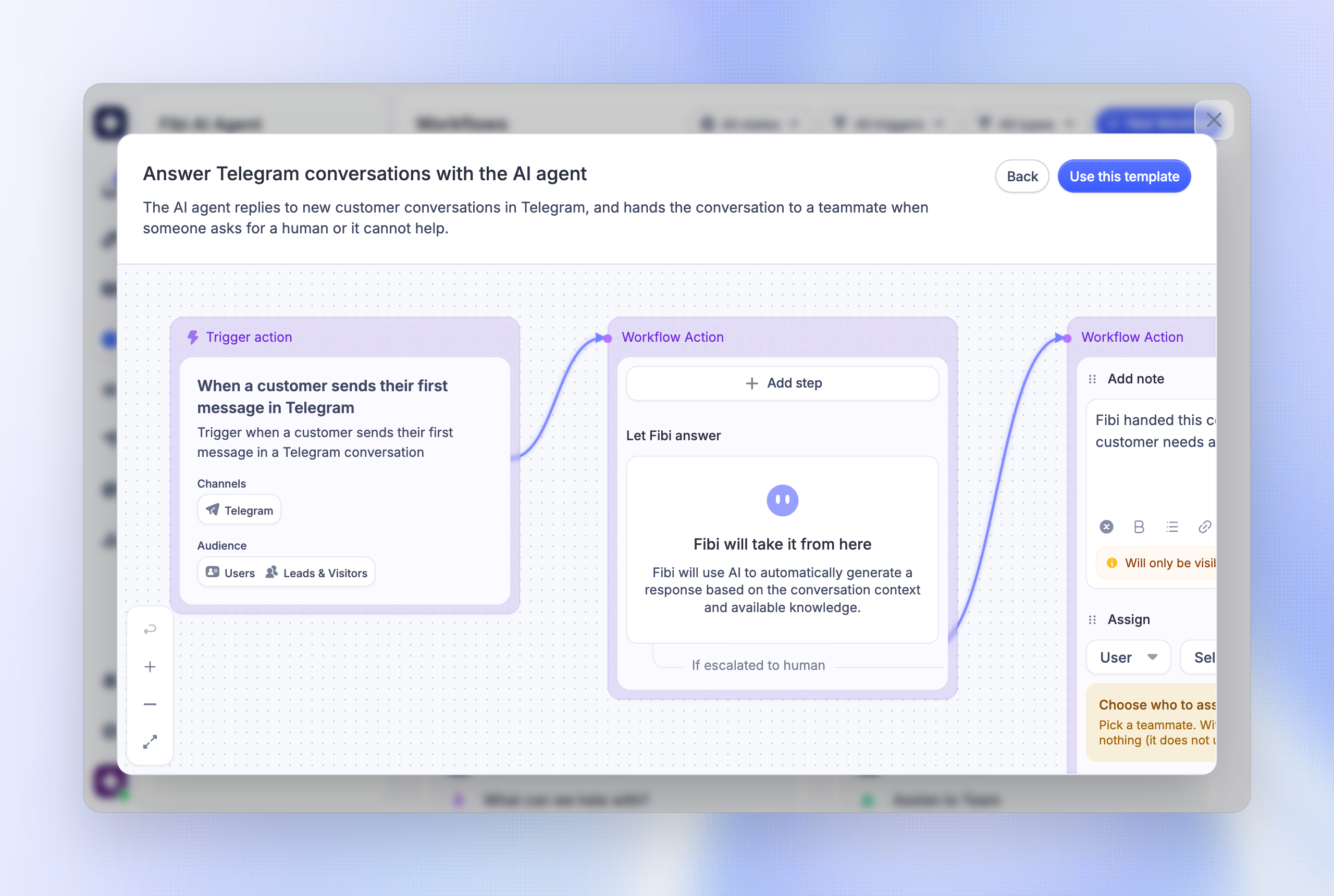
A workflow - Use the Answer Telegram conversations with the AI agent template. Best when you want to choose who the AI agent answers and who takes over after a handoff
Note: The Telegram channel and its template show in Workflows only after you connect a Telegram bot.
Let the AI agent answer with Simple deploy
Simple deploy must be on for your workspace first, in Fibi AI Agent → Deploy.
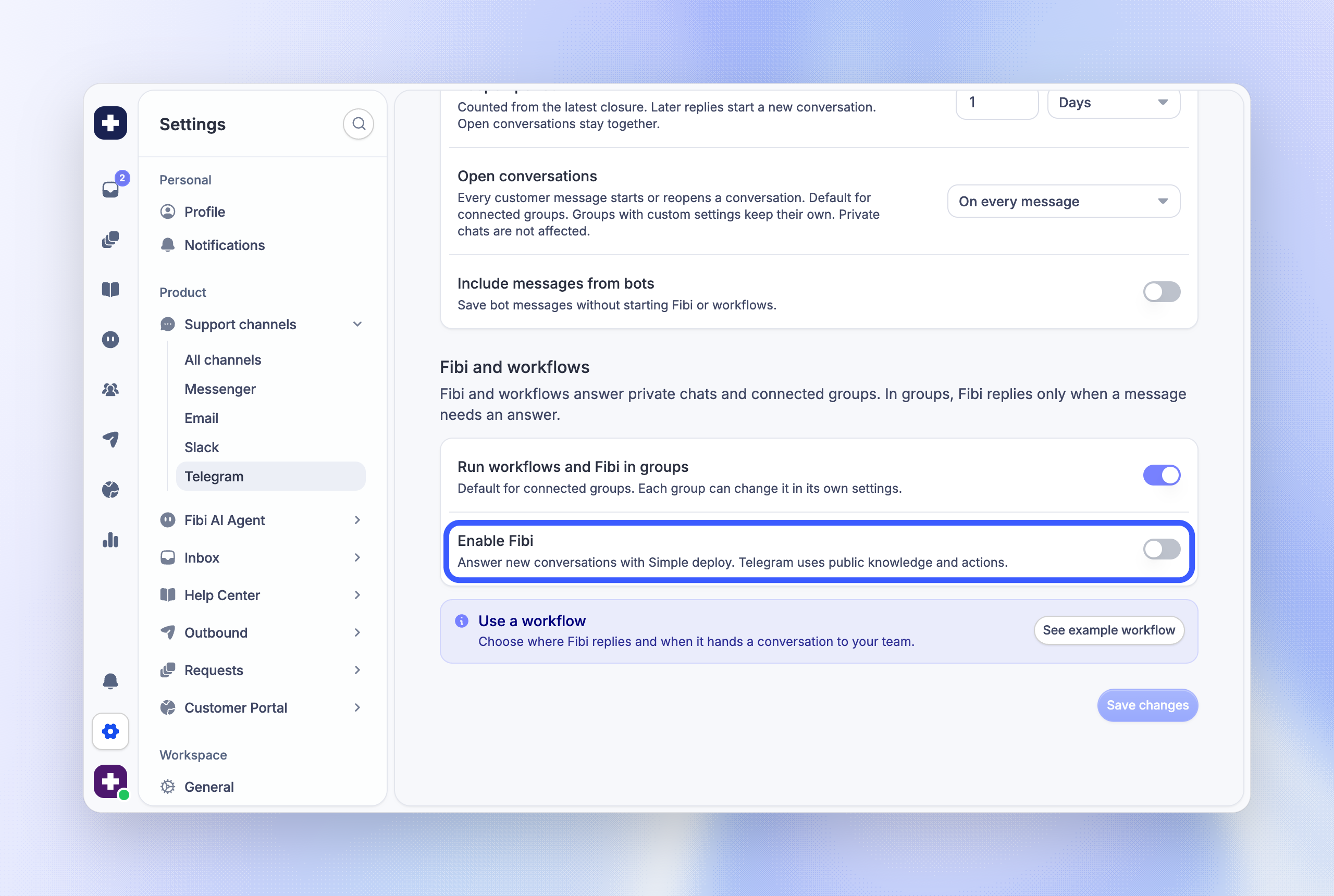
Go to Settings → Support channels → Telegram and click 'Manage' next to the bot
Open Ingestion
Under Fibi and workflows, turn on Enable Fibi
Click 'Save changes'
The AI agent now answers new Telegram conversations of this bot. A group with custom settings uses its own Enable Fibi switch.
In Telegram, the AI agent uses your public knowledge and public actions only. Linking a group to a company doesn't give it access to that company's content.
Let the AI agent answer with a workflow
Go to Settings → Support channels → Telegram, click 'Manage' next to the bot, and open Ingestion
Under Fibi and workflows, click 'See example workflow'. The template Answer Telegram conversations with the AI agent opens in Fibi AI Agent → Workflows
Click 'Use this template'
In the handoff step, choose who to Assign the conversation to
Click 'Set Live'
The workflow starts When a customer sends their first message in Telegram. The AI agent answers, and when the customer asks for a person or the AI agent can't help, the workflow adds a note and assigns the conversation to your team. The template is also listed with the other AI agent templates in Workflows.
How the AI agent behaves in groups
It answers only when needed - In a group, the AI agent replies only when a message needs an answer. It stays quiet on chatter, thanks, and messages addressed to a person
It replies in the thread - Its answer is sent as a Telegram reply to the message it answers
One handoff covers the group - A group without topics is one conversation. When a teammate replies or a member asks for a person, the AI agent stops for the whole group until the conversation is closed
Topics are separate - In a group with forum topics, each topic is its own conversation with its own handoff
To keep the AI agent and workflows out of a group, turn off Run workflows and Fibi in this group in the group's custom settings.
Use Telegram in your own workflows
Choose the Telegram channel
In a workflow trigger, select Telegram under the channels. Telegram is never selected by default, so add it to existing workflows that should run in Telegram.
These triggers run in Telegram: a customer sends a message, a customer sends their first message, a conversation changes state, a conversation is assigned, a note is added, and a customer is unresponsive. New conversation, page visit, and ticket triggers don't run in Telegram.
Actions that work in Telegram
Every conversation action works, except Disable customer reply and Send a product tour. When Telegram is selected, the action menu recommends Create ticket from conversation, which turns the customer's first message into a ticket and keeps the chat linked to it.
Reply buttons - Show 1 to 10 buttons below the message. Each label can have up to 50 characters, on one line, and labels must be unique
Collect data and Send ticket form - Open a form in Telegram. In a group, the bot posts a Fill in details link that opens the form in the customer's private chat with the bot
Ask for conversation rating (CSAT) - Sends the rating buttons to the chat
Collect customer reply - Waits for the customer's next message in Telegram
In a group, only the customer who wrote the latest message can answer reply buttons, forms, and ratings. Others who tap them see "Only the person who asked can answer this."
Use Telegram details in rules
Use the conversation attributes Telegram bot username (without @), Telegram group name, and Telegram chat type (private, group, or supergroup) in workflow rules and branches. For example, route one key customer's group to their account manager, or keep private chats and groups on different paths.
FAQs
Why doesn't the AI agent answer in a group?
Why doesn't the AI agent answer in a group?
Check that Run workflows and Fibi in this group is on, and that Enable Fibi or your workflow covers the group. In groups, the AI agent also stays quiet on messages that don't need an answer. After a teammate replies, it stops until the conversation is closed.
Why can't I select Telegram in a workflow?
Why can't I select Telegram in a workflow?
The workspace has no connected Telegram bot yet, or the trigger doesn't run in Telegram. New conversation is a Messenger trigger: use When customer sends their first message for Telegram.
Do messages from other bots start workflows?
Do messages from other bots start workflows?
No. Messages from other bots are only saved when Include messages from bots is on, and they never start the AI agent or workflows.
Does the AI agent reply when a teammate writes in the group?
Does the AI agent reply when a teammate writes in the group?
No. A message from a linked teammate counts as a team reply and hands the conversation over from the AI agent.
Was this helpful?
Still need help? Ask the team