Reporting metrics & attributes

Look up every Featurebase Reports metric and attribute, including definitions, timestamps, aggregations, available uses, and datasets.

Written By Markus from Featurebase

Last updated 3 days ago

Overview

Every chart in Reports combines:

  1. A metric - what is measured (e.g. New conversations or First response time)

  2. An aggregation - how the metric is calculated (e.g. Count, Average, or Median)

  3. Filters - which records are included (e.g. only conversations from Emails)

  4. Breakdown (optional) - how the result is grouped (e.g. by channel, team, or teammate)

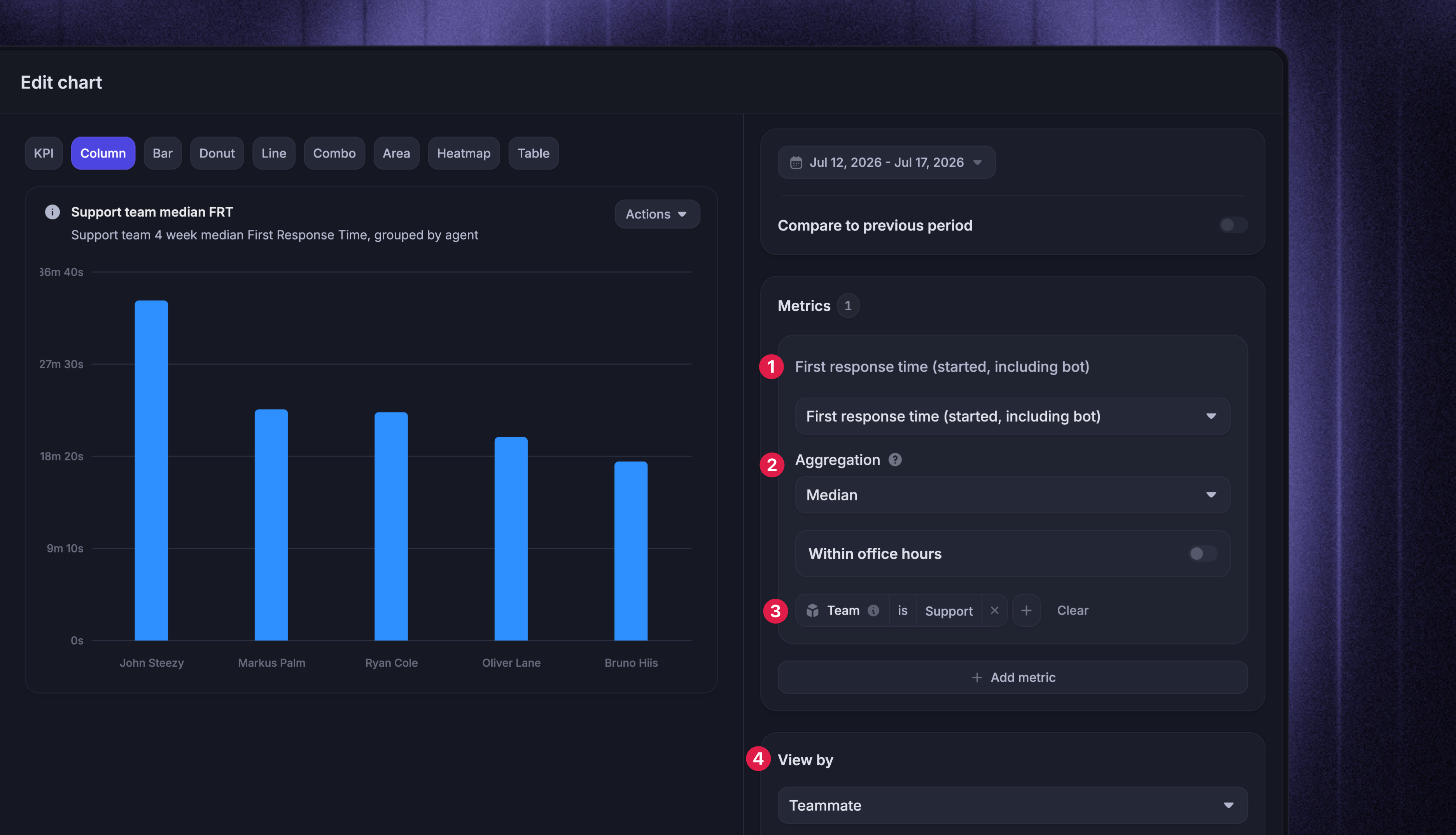
Example: You could select First response time as the metric, Median as the aggregation, filter to the Support team, and set View by to Teammate. This is the example above.

Attributes are the properties used for those filters and breakdowns, such as Channel, Teammate, Conversation tag, or Company plan. They can also appear as columns when you drill into or export the records behind a chart.

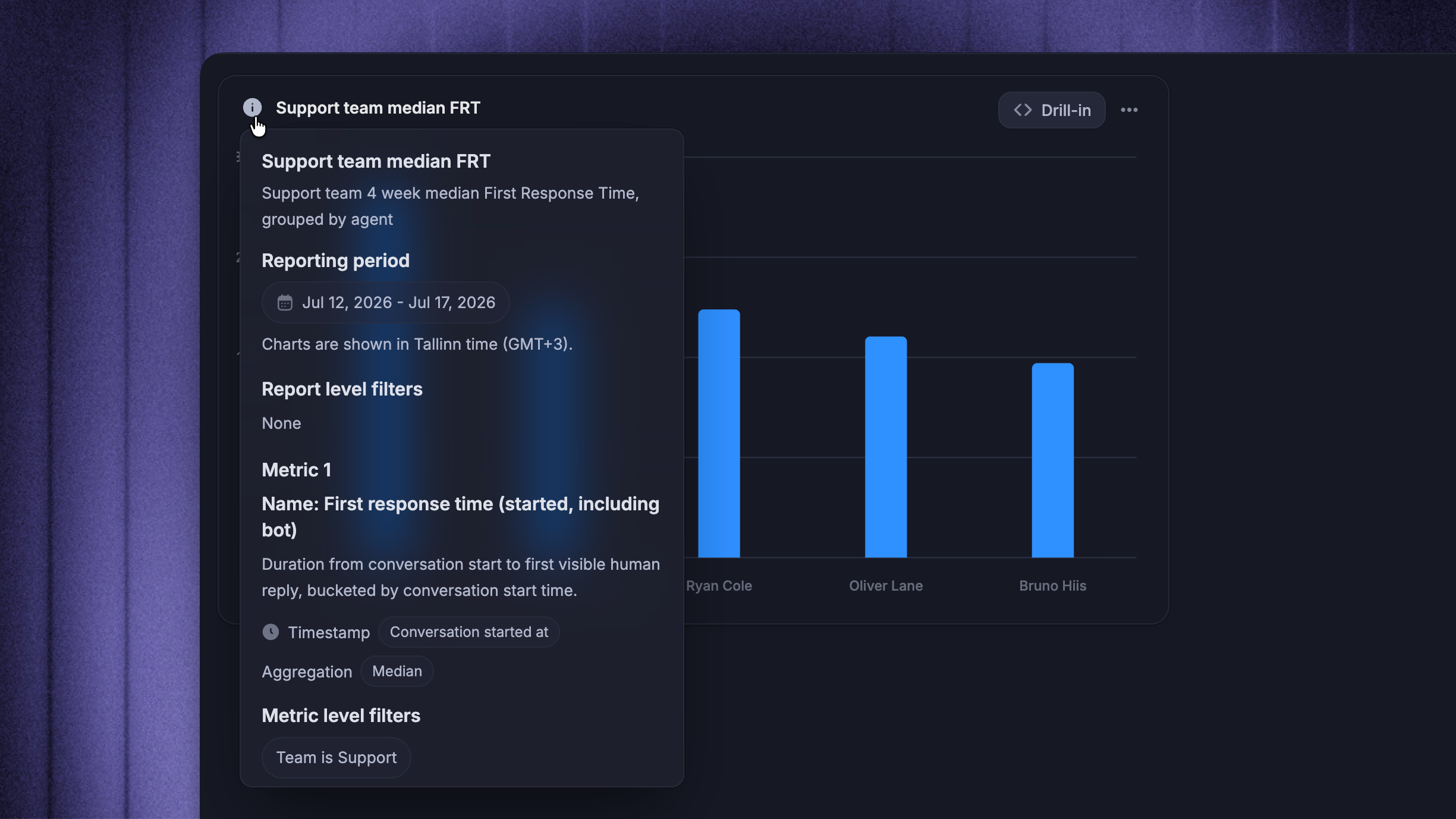
This article defines every metric and attribute. To check what a specific chart measures, select the information icon next to its title. The information card shows:

  • Description - what the metric measures

  • Timestamp - which event determines the reporting period

  • Aggregation - how the values are summarized

  • Office hours - whether the metric uses all hours or only office hours

  • Filters - which rows are included

The same descriptions appear in the Metrics picker, where metrics are grouped by reporting dataset.


How conversations are counted

The New conversations metric is available in two variants, which you choose from the Metrics picker:

  1. Conversation created at - counts every conversation when it is created, including conversations with no customer reply.

  2. Conversation started at - counts a conversation when its first customer message is received (conversations with no customer reply are not included).

For example, if an Outbound message creates a conversation on Monday and the customer replies on Tuesday, Conversation created at counts it on Monday, while Conversation started at counts it on Tuesday. If the customer never replies, only the created-at variant counts it.

Other metrics only include conversations where the event they measure actually happened. A conversation with no visible teammate reply has no first response time, and a conversation never closed by a teammate has no time to close. Each rate definition below states which conversations it uses.

Tip: Use ‘Has customer reply’ and ‘Conversation origin’ in the Conversations dataset to filter or break down these populations.


Metrics
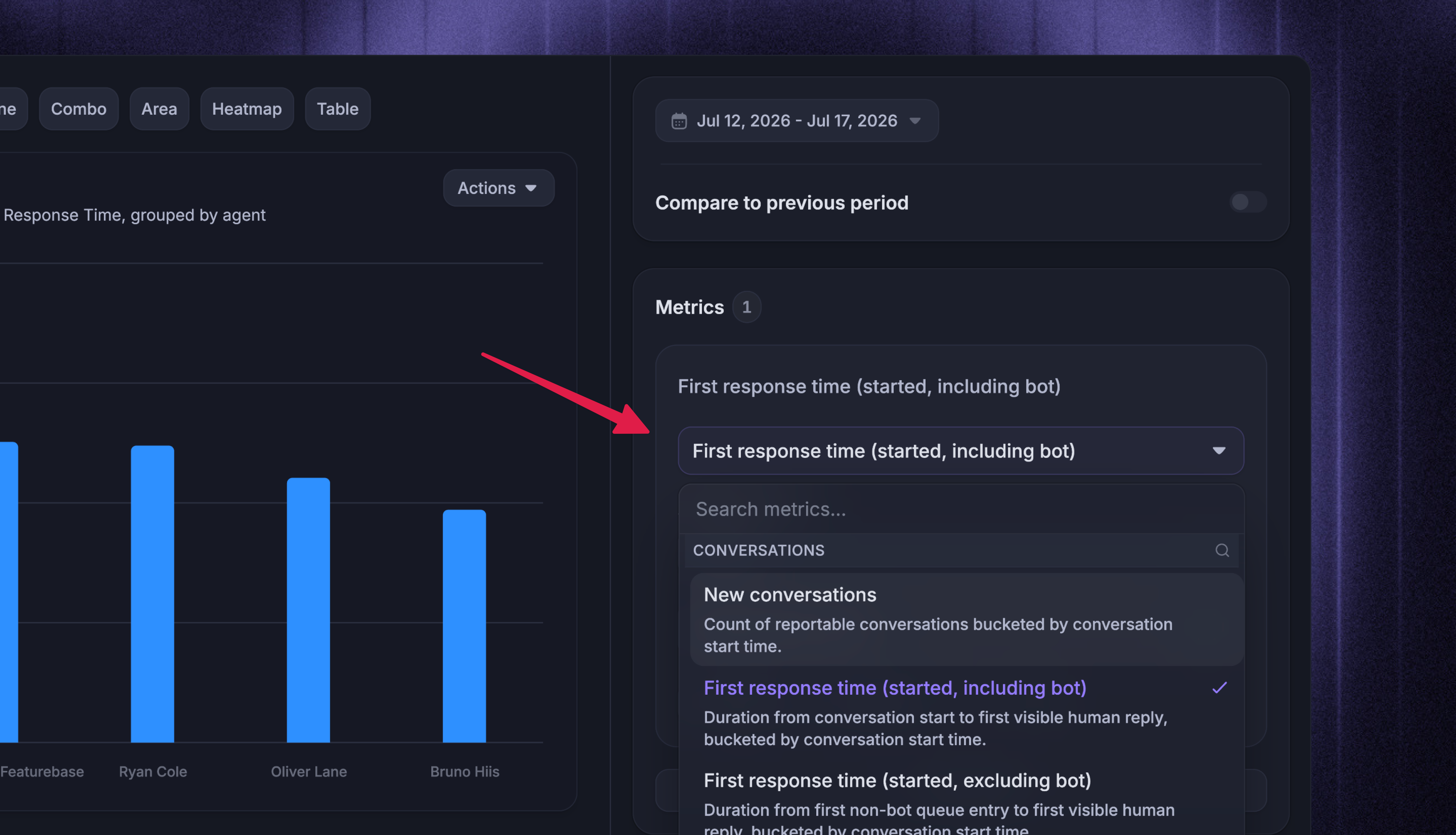
Metrics are grouped by reporting datasets - underlying tables where each row represents a specific type of record (e.g. conversation, action or rating). A metric’s dataset determines what each underlying row represents and which attributes and drill-in columns are available.

Each table below shows:

  • Timestamp - the event that determines when the metric is counted, such as when a conversation was created, a reply was sent, or a ticket was resolved

  • Aggregations - the ways the metric can be summarized. The chart builder only shows aggregations supported by the selected metric. Custom report chart types and options article explains each option.

Duration metrics use All hours by default. Metrics that support ‘Within office hours’ can count only time within the applicable office hours.

Conversations

One row per conversation. Most metrics use Conversation started at, so later replies, closes, and outcomes can update the period in which the conversation began. Variants using another timestamp are identified below.

Metric

Timestamp

Aggregations

Definition

New conversations

Conversation created at

Count

Every conversation created in the period, including conversations with no customer reply

New conversations

Conversation started at

Count

Inbound and outbound conversations whose first customer message was received in the period

Tagged conversations

Conversation started at

Count

Conversations that currently have at least one tag; applying or removing a tag updates the period when the conversation started

Conversations with no reply

Conversation started at

Count

Customer-started conversations that were closed without any reply from a teammate, Fibi AI Agent, or a Workflow

Conversations reassigned

Conversation started at

Count

Unique conversations reassigned after a teammate had replied; routing and triage handoffs before the first reply do not count

Note: In the Overview template, the conversation flow uses a separate New conversations variant that breaks the same volume into Fibi handled without a teammate reply, Workflows, teammate, and no-reply paths.

Response and resolution speed

All of these metrics support Within office hours.

Note: These variants differ in whether time in the Bot inbox counts. Including bot measures the full duration from conversation start. Excluding bot starts when the conversation permanently leaves the Bot inbox for teammate handling, or at conversation start if it never entered the Bot inbox.

Metric

Timestamp

Aggregations

Definition

First response time (started, including bot)

Conversation started at

Average, Median, Minimum, Maximum, Percentile, Sum, Range

Time from conversation start to the first visible teammate reply, including time in the Bot inbox

First response time (started, excluding bot)

Conversation started at

Average, Median, Minimum, Maximum, Percentile, Sum, Range

Time from when the conversation permanently leaves the Bot inbox to the first visible teammate reply, or from conversation start if it never entered the Bot inbox

First response time (first replied, including bot)

Conversation first replied at

Average, Median, Minimum, Maximum, Percentile, Sum, Range

The same duration as the including-bot started variant, bucketed by when the first visible teammate reply was sent

First response time (first replied, excluding bot)

Conversation first replied at

Average, Median, Minimum, Maximum, Percentile, Sum, Range

The same duration as the excluding-bot started variant, bucketed by when the first visible teammate reply was sent

Time to close (including bot)

Conversation started at

Average, Median, Minimum, Maximum, Percentile, Sum, Range

Time from conversation start to the last teammate close, including time in the Bot inbox; conversations never closed by a teammate are excluded

Time to close (excluding bot)

Conversation started at

Average, Median, Minimum, Maximum, Percentile, Sum, Range

Time from when the conversation permanently leaves the Bot inbox to the last teammate close, or from conversation start if it never entered the Bot inbox; conversations never closed by a teammate are excluded

Time to first close (including bot)

Conversation started at

Average, Median, Minimum, Maximum, Percentile, Sum, Range

Time from conversation start to the first teammate close, including time in the Bot inbox; conversations never closed by a teammate are excluded

Time to first close (excluding bot)

Conversation started at

Average, Median, Minimum, Maximum, Percentile, Sum, Range

Time from when the conversation permanently leaves the Bot inbox to the first teammate close, or from conversation start if it never entered the Bot inbox; conversations never closed by a teammate are excluded

Time to first assignment

Conversation started at

Average, Median, Minimum, Maximum, Percentile, Sum, Range

Time from conversation start to the last assignment before the first visible teammate reply

Time from first assignment to close

Conversation started at

Average, Median, Minimum, Maximum, Percentile, Sum, Range

Time from the last assignment before the first visible teammate reply to the last teammate close

Handling time

Metric

Timestamp

Aggregations

Definition

Conversation handling time

Conversation started at

Average, Median, Minimum, Maximum, Percentile, Sum, Range

Total time all teammates spent handling a conversation while it was open and assigned to them, excluding time in the Bot inbox, unassigned in a team inbox, snoozed, or closed; counted once the conversation closes

Adjusted conversation handling time

Conversation started at

Average, Median, Minimum, Maximum, Percentile, Sum, Range

Total time all teammates actively spent working on a conversation, excluding idle time before work resumed after the conversation was assigned, unsnoozed, or reopened; counted once the conversation closes

Resolution quality

Metric

Timestamp

Aggregations

Definition

Closed conversations on first contact rate

Conversation started at

Value

The percentage of conversations closed on first contact by a teammate, meaning closed with a single grouped teammate reply

Reopen rate

Conversation started at

Value

The percentage of closed conversations that were later reopened

Replies to close

Conversation started at

Average, Median, Minimum, Maximum, Value, Sum, Range

Grouped teammate replies needed to close a conversation, across closed conversations with at least one teammate reply; consecutive replies without a customer message count as one

Teammate replies per conversation

Conversation started at

Average

The average number of teammate replies per conversation, including conversations with zero replies

Customer replies per conversation

Conversation started at

Average

The average number of customer replies per conversation, including conversations with zero replies

Reassignments per conversation

Conversation started at

Average

The average number of reassignments per conversation, including conversations that were never reassigned

Fibi AI Agent outcomes

Metric

Timestamp

Aggregations

Definition

Fibi involved conversations

Conversation started at

Count

Conversations where Fibi participated

Fibi involvement rate

Conversation started at

Value

The percentage of reportable conversations where Fibi participated

Fibi deflection rate

Conversation started at

Value

The percentage of Fibi-handled conversations that currently end without human involvement; a reopened conversation stops counting as deflected if a teammate steps in

Fibi resolution rate

Conversation started at

Value

The percentage of Fibi-involved conversations that reached the resolved state, including assumed and customer-confirmed resolutions

Fibi answer rate

Conversation started at

Value

The percentage of Fibi-involved conversations where Fibi generated at least one answer

Fibi escalation rate

Conversation started at

Value

The percentage of Fibi-involved conversations that required human escalation

Fibi pending rate

Conversation started at

Value

The percentage of Fibi-involved conversations still waiting on a final resolution state

Fibi assumed resolution rate

Conversation started at

Value

The percentage of Fibi-involved conversations resolved without explicit customer confirmation; these also count toward Fibi resolution rate

Fibi confirmed resolution rate

Conversation started at

Value

The percentage of Fibi-involved conversations where the customer explicitly confirmed the resolution; these also count toward Fibi resolution rate

Fibi resolution time

Conversation started at

Average, Median, Minimum, Maximum, Percentile, Sum, Range

Time from conversation start to Fibi's resolution, for conversations resolved by Fibi alone; always measures calendar time

Break these metrics down by Fibi answer type to compare answer types or Fibi handoff reason to see what triggered a handoff.

Conversation State

One row per conversation state period, so Reports can count how many conversations sat in a state historically.

Metric

Timestamp

Aggregations

Definition

Open conversations

Conversation state started at

Count

How many conversations were open during each period

Snoozed conversations

Conversation state started at

Count

How many conversations were snoozed during each period

Closed conversations by teammates

Action time

Count

Unique conversations closed by a teammate during the period

Conversation Rating

One row per CSAT lifecycle event, such as a request, response, cancellation, or expiry. Rating counts and CSAT request rate use Conversation rated at, while CSAT response rate uses Conversation started at.

Metric

Timestamp

Aggregations

Definition

Conversation ratings

Conversation rated at

Count

Submitted ratings, one per CSAT request; editing a rating updates that request instead of adding another rating

Positive ratings

Conversation rated at

Count

Submitted Great or Amazing ratings, with scores of 4 or 5

CSAT score

Conversation rated at

Value

The percentage of all submitted ratings that are Great or Amazing, with scores of 4 or 5

CSAT request rate

Conversation rated at

Value

The percentage of new conversations where the customer sent a message that received at least one CSAT survey request

CSAT response rate

Conversation started at

Value

The percentage of new conversations where the customer sent a message in which at least one rating request was responded to, including conversations with no rating request sent

Fibi AI Agent CSAT score

Conversation rated at

Value

The percentage of Fibi ratings that are Great or Amazing, with scores of 4 or 5

Copilot

One row per Copilot prompt, bucketed by Copilot prompt submitted at.

Metric

Timestamp

Aggregations

Definition

Teammates using Copilot

Copilot prompt submitted at

Count

Unique teammates who used Copilot during the period

Copilot questions

Copilot prompt submitted at

Count

Prompts teammates submitted to Copilot; when grouped by source, a prompt counts under every source its answer referenced

Copilot assisted conversations

Copilot prompt submitted at

Count

Unique conversations with at least one Copilot interaction

Copilot conversation assistance rate

Copilot prompt submitted at

Value

The percentage of reportable conversations assisted by Copilot

Copilot copied answer rate

Copilot prompt submitted at

Value

The percentage of Copilot-assisted conversations where an answer was copied, inserted, or sent

Copilot conversations with copied answer

Copilot prompt submitted at

Count

Unique conversations where a Copilot answer was used

Copilot time saved estimate

Copilot prompt submitted at

Average, Median, Minimum, Maximum, Value, Sum, Range

Estimated time saved for each Copilot prompt; several prompts in one conversation contribute separately

Conversation Actions

One row per reply, note, assignment, close, or reopen. Metrics use Action time, so events count when they happen, even if the conversation started earlier.

Metric

Timestamp

Aggregations

Definition

Closed conversations

Action time

Count

Close events on conversations; a conversation that is closed, reopened, and closed again counts twice

Reopened conversations

Action time

Count

Unique conversations reopened after a prior close

Conversations replied to

Action time

Count

Unique conversations that received at least one visible teammate reply during the period

Replies sent

Action time

Count

Visible teammate replies sent during the period

Response time (started at)

Reply interval started at

Average, Median, Minimum, Maximum, Percentile, Sum, Range

Each customer-to-teammate response interval; supports Within office hours

Response time (reply sent at)

Reply interval replied at

Average, Median, Minimum, Maximum, Percentile, Sum, Range

Each customer-to-teammate response interval, bucketed by when the reply was sent; supports Within office hours

Conversations assigned

Action time

Count

Unique conversations assigned during the period

Conversations participated

Action time

Count

Unique conversations where a teammate replied or left a note

Notes created

Action time

Count

Internal notes created

Mentions

Action time

Count

Individual teammate mentions in replies or notes; a message that mentions several teammates counts once for each teammate

Teammate Handling

One row per teammate handling period. This dataset contains teammate-level handling metrics and per-active-hour productivity metrics.

Metric

Timestamp

Aggregations

Definition

Teammate handling time

Conversation started at

Average, Median, Minimum, Maximum, Percentile, Sum, Range

Time a teammate spent handling a conversation while it was open and assigned to them, excluding time in the Bot inbox, unassigned in a team inbox, snoozed, or closed; supports Within office hours

Adjusted teammate handling time

Conversation started at

Average, Median, Minimum, Maximum, Percentile, Sum, Range

Presence-based time a teammate actively spent working on a conversation; pauses when they switch conversations, snooze, close, reassign, or become automatically away, independently of any office-hours schedule

Adjusted teammate handling time, within office hours

Conversation started at

Average, Median, Minimum, Maximum, Percentile, Sum, Range

The same presence-based active intervals, clipped to the teammate, team, or workspace schedule resolved for the metric

Note: Adjusted handling time is calculated separately for each teammate after reassignment. The base metric remains presence-based whether or not office hours are configured - only the explicit ‘Within office hours’ variant removes active intervals outside the resolved schedule.

When no idle time is detected, adjusted handling time equals regular teammate handling time. Teammate Performance reporting explains how the handling clock works.

Per-active-hour productivity

Metric

Timestamp

Aggregations

Definition

Conversations closed per active hour

Handling started at

Value

Unique conversations closed by a teammate divided by that teammate's active time

Conversations assigned per active hour

Handling started at

Value

Unique conversations assigned to a teammate divided by that teammate's active time

Conversations replied to per active hour

Handling started at

Value

Unique conversations replied to divided by teammate active time

Conversations participated per active hour

Handling started at

Value

Unique conversations where a teammate replied or left a note, divided by that teammate's active time

Teammate replies sent per active hour

Handling started at

Value

Visible teammate replies divided by teammate active time

Note: The office-hours toggle does not apply to per-active-hour metrics. Teammate Performance reporting explains how to use them and how active time is measured.

Teammate Status Period

One row per teammate availability period, bucketed by Period started at. Use the three status metrics to compare time active, away, and away and reassigning. Each row also records Teammate status, Period ended at, the teammate, and an Away reason when one applies.

Metric

Timestamp

Aggregations

Definition

Teammate time active

Period started at

Sum

The total time teammates spent in an active status; this is the active time the per-active-hour metrics divide by

Teammate time away

Period started at

Sum

The total time teammates spent in an away status

Teammate time away & reassign

Period started at

Sum

The total time teammates spent in an away and reassigning status

SLA

One row per applied SLA target and one row per target evaluation. SLA metrics do not have an office-hours toggle - they use the timing defined by the SLA policy.

Metric

Timestamp

Aggregations

Definition

SLAs applied

SLA started at

Count

Times an SLA policy was applied to a conversation or ticket; each enabled target is evaluated separately

SLAs hit

SLA started at

Count

Target evaluations that hit their target, bucketed by when the evaluation window started

SLAs missed

SLA started at

Count

Target evaluations that missed their target, bucketed by when the evaluation window started

SLAs missed

SLA missed at

Count

The same missed target evaluations, bucketed by when the miss happened

SLA hit rate

SLA started at

Value

The percentage of evaluations that hit their target, bucketed by when the evaluation window started

SLA miss rate

SLA started at

Value

The percentage of evaluations that missed their target, bucketed by when the evaluation window started

Conversations and tickets with SLA

SLA started at

Count

Unique conversations and tickets with at least one SLA applied

Conversations and tickets with missed SLA

SLA started at

Count

Unique conversations and tickets with at least one missed target, bucketed by when the SLA started

Conversations and tickets SLA miss rate

SLA started at

Value

The percentage of conversations and tickets with an SLA that later breached at least one target, bucketed by when the SLA started

Time to response after SLA miss

SLA started at

Average, Median, Minimum, Maximum, Percentile, Sum, Range

Time from when an SLA was missed until the conversation or ticket received a teammate reply

Tickets

One row per ticket.

Metric

Timestamp

Aggregations

Definition

New tickets

Ticket created at

Count

Tickets created during the period

Resolved tickets

Ticket last resolved at

Count

Tickets whose most recent resolved transition fell inside the period; a ticket resolved, reopened, and resolved again counts in the period of the latest resolution

Ticket time to resolve

Ticket last resolved at

Average, Median, Minimum, Maximum, Percentile, Sum, Range

Time from ticket creation to its latest resolved timestamp; unresolved tickets do not contribute, reopened tickets use their latest resolution, and Within office hours is supported

Tickets time in state

One row per ticket state interval, bucketed by Ticket state entered at. The Tickets report uses this data to compare resolution time and time spent in each state.

Metric

Timestamp

Aggregations

Definition

Ticket time in state

Ticket state entered at

Average, Median, Minimum, Maximum, Percentile, Sum, Range

Duration of each ticket state interval; the current interval keeps growing until the ticket leaves that state, and calendar time is always used. Group by Ticket custom state for your own state names or Ticket state category to compare setups


Attributes

Use attributes to:

  • Filter charts and reports

  • Break down results with View by and Segment by

  • Choose columns in drill-in tables and exports

The tables follow the picker categories. ‘Uses’ shows whether an attribute can be used as a filter, a breakdown, or only as a drill-in and export column. Exact options can still depend on the metric and dataset, so the pickers only show combinations that apply.

Attribute values can be historical snapshots, current-state values, or action-anchored values. Customer, company, and custom attributes preserve the value captured for the historical reporting row. Conversation properties such as Conversation tag, Priority, and Conversation state reflect their latest values. Action-anchored attributes preserve what was true when an event happened, such as who sent the first reply or which team owned a conversation at close. Teammate filters in reports explains teammate and team attribution.

The Datasets column lists every dataset where each attribute is available. When an attribute and metric share a name, the attribute filters row-level values while the metric charts the aggregate.

Conversation attributes

Attribute

Definition

Uses

Datasets

Conversation ID

The unique conversation identifier used across reporting datasets

Filter only

Conversations, Conversation State, Conversation Rating, Copilot, Conversation Actions, Teammate Handling, SLA, Tickets, Tickets time in state

Title

The conversation's current title

Filter only

Conversations, Conversation State, Conversation Actions, Teammate Handling, Tickets, Tickets time in state

Conversation state

The conversation's current state on most datasets; on Conversation State, the state recorded for that historical period: open, snoozed, or closed

Filter and breakdown

Conversations, Conversation State, Conversation Actions, Teammate Handling, Tickets, Tickets time in state

Previous conversation state

The state a conversation was in before a state period

Filter and breakdown

Conversation State

Channel

The grouped channel behind the conversation: Chat, Email, Slack, or Unknown

Filter and breakdown

Conversations, Conversation State, Conversation Actions, Teammate Handling, SLA, Tickets, Tickets time in state

Conversation source

The raw source behind the channel, splitting chat into desktop, Android, and iOS

Filter and breakdown

Conversations, Conversation State, Conversation Actions, Teammate Handling, SLA, Tickets, Tickets time in state

Source URL

The page URL the conversation started from, when available

Filter and breakdown

Conversations, Conversation State, Conversation Actions, Teammate Handling, SLA, Tickets, Tickets time in state

Conversation URL

The Inbox URL for the conversation, shown as a drill-in and export column

Drill-in/export only

Conversations

Brand

The brand associated with the conversation

Filter and breakdown

Conversations, Conversation State, Conversation Actions, Teammate Handling, Tickets, Tickets time in state

Conversation tag

The tags currently applied to the conversation; multi-value, so a breakdown counts a conversation once per tag

Filter and breakdown

Conversations, Conversation State, Conversation Rating, Conversation Actions, Teammate Handling, SLA, Tickets, Tickets time in state

Priority

Whether the conversation is currently marked as priority

Filter and breakdown

Conversations, Conversation State, Conversation Actions, Teammate Handling, SLA, Tickets, Tickets time in state

Conversation initiator type

The actor type that started the conversation: a teammate, customer, guest, integration, Fibi AI Agent or Workflow, lead, or team

Filter and breakdown

Conversations, Conversation State, Conversation Actions, Teammate Handling, SLA, Tickets, Tickets time in state

Conversation origin

Where the conversation originated, separating customer-started conversations from ones your team or an Outbound message started

Filter and breakdown

Conversations

Has customer reply

Whether the customer sent at least one message, separating engaged conversations from Outbound and Workflow conversations nobody replied to

Filter and breakdown

Conversations

Current assignee type

Whether the conversation or ticket is currently assigned to a teammate, a team, or no assignee

Filter and breakdown

Conversations, Conversation State, Conversation Actions, Teammate Handling, Tickets, Tickets time in state

Workflows replied

Whether the conversation received a reply from Workflows before or without a teammate reply

Filter and breakdown

Conversations, Conversation State, Conversation Actions, Teammate Handling, Tickets, Tickets time in state

Close actor type

The actor type that most recently closed the conversation, for example a teammate, the customer, Workflows, Fibi, or the system

Filter and breakdown

Conversations, Conversation State, Conversation Actions

Reopen actor type

The actor type that reopened the conversation

Filter and breakdown

Conversations, Conversation State, Conversation Actions

Handoff source

What handed the conversation to your team: Fibi, Workflows, or a teammate

Filter and breakdown

Conversations, Conversation Actions

Handoff reason

The reason recorded when a conversation was handed to a human teammate

Filter and breakdown

Conversations, Conversation Actions

Action ID

The identifier of the individual action row behind a per-event metric

Filter only

Conversation Actions

Action type

The kind of action a row represents: Reply, Change conversation state, Assign conversation, Create note, Mention teammate, or Conversation participation

Filter and breakdown

Conversation Actions

Counts

Use these attributes to filter populations, such as conversations with more than five teammate replies.

Attribute

Definition

Uses

Datasets

Assignment count

The total number of assignment events on the conversation

Filter only

Conversations

Reassignment count

The total number of reassignment events on the conversation

Filter only

Conversations

Replies to close count

The grouped teammate reply count used by the effectiveness metrics

Filter only

Conversations, Conversation Actions

Customer replies count

The total number of customer replies on the conversation

Filter only

Conversations, Conversation Actions

Teammate replies count

The total number of visible teammate replies on the conversation

Filter only

Conversations, Conversation Actions

Durations

Filter rows by recorded durations. Office-hours variants contain values adjusted to count only the workspace, team, or teammate schedule resolved for that metric.

Attribute

Definition

Uses

Datasets

First response time and First response time in office hours

From conversation start to the first visible teammate response

Filter only

Conversations

Response time and Response time in office hours

From a customer reply to the teammate response that answered it

Filter only

Conversation Actions

Handling time

The total teammate handling time recorded for a conversation or handling period

Filter only

Conversations, Conversation State, Teammate Handling

Time to first assignment

From conversation start to the last assignment before the first visible teammate reply

Filter only

Conversations, Conversation Actions

Time to first assignment in office hours

From conversation start to the last assignment before the first visible teammate reply, counting only workspace office hours

Filter only

Conversations

Time from first assignment to close

From the last assignment before the first visible teammate reply to the last teammate close

Filter only

Conversations, Conversation Actions

Time from first assignment to close in office hours

From the last assignment before the first visible teammate reply to the last teammate close, counting only workspace office hours

Filter only

Conversations

Assignment before first reply and Assignment before first reply in office hours

From conversation start to the last assignment before the first teammate reply

Filter only

Conversations

Time to close

From conversation start to the last teammate close; empty when no teammate closed the conversation

Filter only

Conversations, Conversation State

Time to close in office hours

From conversation start to the last teammate close, counting only workspace office hours; empty when no teammate closed the conversation

Filter only

Conversations

Time to first close

From conversation start to the first teammate close; empty when no teammate closed the conversation

Filter only

Conversations, Conversation State

Team assignment to first response

From assignment to a team inbox until the first teammate response

Filter only

Conversation Actions

Team assignment to subsequent response

From each later customer message to the next teammate response while assigned to the team inbox

Filter only

Conversation Actions

Team assignment to close

From assignment to a team inbox until a teammate closes the conversation while that team is responsible

Filter only

Conversation Actions

Teammate assignment to first response

From assignment to a teammate until they send the first response

Filter only

Conversation Actions

Teammate assignment to subsequent response

From each later customer message to the teammate's next response after the first response; does not require the conversation to be assigned to that teammate

Filter only

Conversation Actions

Teammate assignment to close

From assignment to a teammate until that teammate first closes the conversation

Filter only

Conversation Actions, Teammate Handling

Note: Despite their customer-facing names, Time to first assignment, Time from first assignment to close, and Assignment before first reply use the last assignment before the first visible teammate reply. This prevents assignments that happened before a later pre-reply reassignment from inflating the teammate's response and close durations.

Duration buckets

Preset ranges used by breakdown charts in the Responsiveness template.

Attribute

Definition

Uses

Datasets

First response time interval

Preset ranges from under 30 seconds to over an hour

Filter and breakdown

Conversations

Time to close interval

Preset ranges from under 5 minutes to over 8 hours

Filter and breakdown

Conversations

Ticket attributes

These attributes are available in Tickets and Tickets time in state. Ticket type, Ticket category, and current ticket state attributes also appear on conversation rows linked to a ticket.

Attribute

Definition

Uses

Datasets

Ticket ID

The unique ticket identifier

Filter only

Tickets, Tickets time in state

Ticket number

The sequential ticket number visible in your workspace

Filter only

Tickets, Tickets time in state

Ticket title

The ticket's current title

Filter only

Tickets, Tickets time in state

Ticket type

The ticket's type, as configured in your workspace

Filter and breakdown

Conversations, Conversation Actions, SLA, Tickets, Tickets time in state

Ticket category

Whether the ticket is a Customer ticket, Back-office ticket, or Tracker ticket

Filter and breakdown

Conversations, Conversation State, Conversation Actions, Tickets, Tickets time in state

Ticket custom state

The custom state a ticket was in during a time-in-state interval

Filter and breakdown

Tickets time in state

Ticket state ID

The underlying state identifier behind a time-in-state interval

Filter only

Tickets time in state

Ticket state category

The state category a historical interval belongs to: Submitted, In progress, Waiting on customer, Resolved, Canceled, Reviewing, or Unknown

Filter and breakdown

Tickets time in state

Current ticket custom state

The custom state the ticket is in right now

Filter and breakdown

Conversations, Conversation Actions, SLA, Tickets, Tickets time in state

Current ticket state category

The state category the ticket is in right now

Filter and breakdown

Conversations, Conversation Actions, SLA, Tickets, Tickets time in state

Current state interval

Whether a time-in-state row is the ticket's current, still-running interval

Filter and breakdown

Tickets time in state

Shared with customer

Whether the ticket is visible to the customer

Filter and breakdown

Tickets, Tickets time in state

Ticket URL

The URL used to open the ticket, shown as a drill-in and export column

Drill-in/export only

Tickets, Tickets time in state

Ticket created by

The display name of whoever created the ticket

Filter and breakdown

Tickets, Tickets time in state

Ticket created by ID

The identifier of the ticket's creator

Filter only

Tickets, Tickets time in state

Ticket created by type

The actor type that created the ticket: a teammate, customer, guest, integration, Fibi AI Agent, or Workflow

Filter and breakdown

Tickets, Tickets time in state

Ticket time to resolve

The raw resolution duration recorded on the ticket

Filter only

Tickets

Ticket time to resolve in office hours

The resolution duration adjusted to count only workspace office hours

Filter only

Tickets

Ticket time in state

The duration of a single state interval

Filter only

Tickets time in state

Timestamp attributes

Timestamps record when things happened. Metrics bucket by them, drill-in shows them as columns, and some can be filtered with before, after, and between comparisons.

Attribute

Definition

Uses

Datasets

Conversation started at

The first end-user or customer message on the conversation

Drill-in/export only

Conversations, Conversation State, Conversation Actions

Conversation created at

When the conversation was created, whether or not a customer ever replied; the timestamp the created-at New conversations count buckets by

Drill-in/export only

Conversations

Conversation first replied at

The first visible human teammate reply

Drill-in/export only

Conversations

Conversation last replied at

The latest visible human teammate reply

Filter only

Conversations

Conversation first assigned at

The first assignment event on the conversation

Filter only

Conversations

Conversation last assigned at

The latest assignment event on the conversation

Filter only

Conversations

Last assignment before first reply at

The latest assignment before the first teammate reply

Filter only

Conversations

Conversation first closed at

When the conversation was first closed

Drill-in/export only

Conversations, Conversation State

Conversation last closed at

When the conversation was most recently closed

Drill-in/export only

Conversations, Conversation State

Action time

When a reply, note, assignment, reopen, or close action happened

Drill-in/export only

Conversation State, Conversation Actions

Conversation rated at

When a conversation rating was submitted

Drill-in/export only

Conversations, Conversation Rating

Rating requested at

When a CSAT request was delivered to the customer

Drill-in/export only

Conversations, Conversation Rating

Rating cancelled at

When a CSAT request was canceled or expired without a response

Drill-in/export only

Conversation Rating

Conversation state started at and Conversation state ended at

When a conversation state period began and ended

Drill-in/export only

Conversation State

Reportable at

When the conversation first became reportable

Drill-in/export only

Conversations

Handoff at

When Fibi AI Agent handed the conversation to a teammate

Drill-in/export only

Conversations

Reply interval started at and Reply interval replied at

When a customer-to-teammate response interval began and ended

Drill-in/export only

Conversation Actions

Handling started at

When a teammate handling period started

Drill-in/export only

Teammate Handling

Period started at and Period ended at

When a teammate status period began and ended

Drill-in/export only

Teammate Status Period

Copilot prompt submitted at

When a teammate submitted a Copilot prompt

Drill-in/export only

Copilot

SLA started at

When an SLA evaluation window started

Drill-in/export only

SLA

SLA evaluated at

When an SLA row was evaluated as hit or missed

Drill-in/export only

SLA

SLA missed at

When an SLA target was missed

Drill-in/export only

SLA

Ticket created at

When the ticket was created

Filter only

Tickets, Tickets time in state

Current ticket state entered at

When the ticket most recently entered its current state

Filter only

Tickets, Tickets time in state

Ticket resolved at

When the ticket was resolved, if it currently is

Filter only

Tickets, Tickets time in state

Ticket last resolved at

The last time the ticket entered a resolved state

Filter only

Tickets, Tickets time in state

Ticket state entered at and Ticket state exited at

When a historical ticket state interval began and ended

Filter only

Tickets time in state

People attributes

People attributes describe the end-user values captured for the historical reporting row.

Attribute

Definition

Uses

Datasets

User ID

The end-user linked to the conversation

Filter and breakdown

Conversations, Conversation State, Conversation Rating, Copilot, Conversation Actions, Teammate Handling, SLA, Tickets, Tickets time in state

Username

The end-user's name

Filter and breakdown

Conversations, Conversation State, Conversation Rating, Copilot, Conversation Actions, Teammate Handling, SLA, Tickets, Tickets time in state

User email

The end-user's email address

Filter only

Conversations, Conversation State, Conversation Rating, Copilot, Conversation Actions, Teammate Handling, SLA, Tickets, Tickets time in state

User pseudonym

A pseudonymous label for the end-user, shown as a drill-in and export column

Drill-in/export only

Conversations, Conversation State, Conversation Rating, Copilot, Conversation Actions, Teammate Handling, SLA, Tickets, Tickets time in state

User type

Whether the end-user is a customer or a lead

Filter and breakdown

Conversations, Conversation State, Conversation Rating, Copilot, Conversation Actions, Teammate Handling, SLA, Tickets, Tickets time in state

Country

The end-user's country

Filter and breakdown

Conversations, Conversation State, Conversation Rating, Copilot, Conversation Actions, Teammate Handling, SLA, Tickets, Tickets time in state

Continent

The end-user's continent

Filter and breakdown

Conversations, Conversation State, Conversation Rating, Copilot, Conversation Actions, Teammate Handling, SLA, Tickets, Tickets time in state

Language

The end-user's preferred language captured for the historical reporting row

Filter and breakdown

Conversations, Conversation State, Conversation Rating, Copilot, Conversation Actions, Teammate Handling, SLA, Tickets, Tickets time in state

User tag

The tags applied to the end-user; multi-value, so a breakdown counts a conversation once per tag

Filter and breakdown

Conversations, Conversation State, Conversation Rating, Copilot, Conversation Actions, Teammate Handling, SLA, Tickets, Tickets time in state

Participant IDs

The identifiers of everyone currently attached to the conversation

Filter only

Conversations

Participant names

The names of everyone currently attached to the conversation

Drill-in/export only

Conversations

Participant emails

The email addresses of everyone currently attached to the conversation

Filter only

Conversations

Participant types

The actor types of everyone currently attached to the conversation

Filter only

Conversations

Participant count

The number of unique participants on the conversation

Filter only

Conversations

Company attributes

Company attributes describe the company values captured for the historical reporting row.

Attribute

Definition

Uses

Datasets

Company ID

The company associated with the end-user

Filter and breakdown

Conversations, Conversation State, Conversation Rating, Copilot, Conversation Actions, Teammate Handling, SLA, Tickets, Tickets time in state

Company name

The company's name

Filter and breakdown

Conversations, Conversation State, Conversation Rating, Copilot, Conversation Actions, Teammate Handling, SLA, Tickets, Tickets time in state

Company plan

The company's plan value, as you send it to Featurebase

Filter and breakdown

Conversations, Conversation State, Conversation Rating, Copilot, Conversation Actions, Teammate Handling, SLA, Tickets, Tickets time in state

Company size

The company's size value

Filter only

Conversations, Conversation State, Conversation Rating, Copilot, Conversation Actions, Teammate Handling, SLA, Tickets, Tickets time in state

Teammate attributes

Teammate attributes tie rows to the current assignee or to the teammate associated with a reply, close, rating, action, handling period, or SLA evaluation.

Attribute

Definition

Uses

Datasets

Teammate

The dynamic filter: each chart interprets it using the attribution that fits its metric

Filter and breakdown

Conversations, Conversation State, Conversation Rating, Copilot, Conversation Actions, Teammate Handling, Teammate Status Period, SLA, Tickets, Tickets time in state

Teammate currently assigned

The teammate currently assigned to the conversation or ticket

Filter and breakdown

Conversations, Conversation Actions, Teammate Handling, SLA, Tickets

Teammate replied to

Every teammate who ever replied to the conversation; multi-value

Filter and breakdown

Conversations, Conversation State, Conversation Rating, Conversation Actions, SLA

Teammate first replied

The teammate who sent the first visible reply

Filter and breakdown

Conversations

Teammate last replied

The teammate who sent the latest visible reply

Filter and breakdown

Conversations

First closed by teammate

The teammate who closed the conversation the first time

Filter and breakdown

Conversations, Conversation State

Last closed by teammate

The teammate who closed it most recently

Filter and breakdown

Conversations, Conversation State

Teammate rated

The teammate a CSAT rating applies to

Filter and breakdown

Conversation State, Conversation Rating

Last teammate rated

The most recent teammate in the conversation's rating flow

Filter and breakdown

Conversation State, Conversation Rating

Action performed by

The teammate who performed an individual action row

Filter and breakdown

Conversation Actions

Handled by teammate

The teammate who actively worked the conversation during a handling period

Filter and breakdown

Teammate Handling

SLA attributed to

The teammate assigned when an SLA target was evaluated

Filter and breakdown

SLA

Teammate is a member of

Narrows teammate-scoped results to the current members of the selected team; filter only

Filter only

Conversation Rating, Copilot, Teammate Handling, Teammate Status Period

Teammate status

The status recorded for the period: Active, Away, or Away and reassigning

Filter and breakdown

Teammate Status Period

Away reason

The reason recorded when a teammate was set to away

Filter and breakdown

Teammate Status Period

Team attributes

Attribute

Definition

Uses

Datasets

Team

The dynamic filter: each chart interprets it using the team attribution that fits its metric

Filter and breakdown

Conversations, Conversation State, Conversation Rating, Copilot, Conversation Actions, Teammate Handling, SLA, Tickets, Tickets time in state

Team assigned

The team the conversation was assigned to at assignment time

Filter and breakdown

Conversations, Conversation Actions, Teammate Handling, SLA

Team currently assigned

The team currently assigned to the conversation or ticket

Filter and breakdown

Conversations, Conversation Actions, Teammate Handling, SLA, Tickets

Team replied to

The team associated with a historical teammate reply

Filter and breakdown

Conversations, Conversation Actions

Team last replied

The team associated with the latest visible reply

Filter and breakdown

Conversations

Team at action time

The team that owned the conversation when an action happened

Filter and breakdown

Conversation Actions, Teammate Handling, SLA

Fibi attributes

Attribute

Definition

Uses

Datasets

Fibi involved

Whether Fibi participated in the conversation

Filter and breakdown

Conversations, Conversation Rating, Teammate Handling

Fibi resolution state

Where the conversation stands on its Fibi path, such as active, handed off to a human, or resolved

Filter and breakdown

Conversations, Teammate Handling

Fibi answer type

How Fibi answered: an AI Answer generated from your knowledge sources or a Custom Answer you configured

Filter and breakdown

Conversations, Conversation Actions, Teammate Handling

Fibi deflected

Whether the conversation currently ends without human involvement after Fibi handled it; reopening it and involving a teammate can change this outcome

Filter and breakdown

Conversations

Fibi handoff reason

Why the handoff happened: usage cap, agent handoff, or error

Filter and breakdown

Conversations, Conversation Actions, Teammate Handling

Fibi handoff trigger

What triggered the handoff: customer requested, configuration, default behavior, Procedure, usage cap, or error

Filter and breakdown

Conversations

Fibi rating

The numeric rating on a Fibi-rated conversation

Filter only

Conversations, Conversation State, Conversation Rating

Fibi remark

The written remark a customer left when rating Fibi

Filter only

Conversations, Conversation Rating

Fibi rating updated at

The latest timestamp of a Fibi rating or rating request, shown as a drill-in and export column

Drill-in/export only

Conversations

Fibi answer source ID

The knowledge source Fibi used in an answer; multi-value

Filter and breakdown

Conversations, Conversation Actions, Teammate Handling

Fibi answer source title

The title of a knowledge source Fibi used; multi-value

Filter and breakdown

Conversations, Conversation Actions, Teammate Handling

Fibi answer source type

Whether an answer's source is external content or a Custom Answer; multi-value

Filter and breakdown

Conversations, Conversation Actions, Teammate Handling

Copilot attributes

Copilot attributes cover per-prompt details and conversation-level usage rollups.

Attribute

Definition

Uses

Datasets

Copilot used

Whether Copilot was used at all on the conversation

Filter and breakdown

Conversations, Conversation State, Copilot

Copilot questions count

The number of Copilot prompts submitted on the conversation

Filter only

Conversations

Copilot answer copied

Whether any Copilot answer was copied on the conversation

Filter only

Conversations

Teammate who asked

The teammate who submitted the prompt

Filter and breakdown

Copilot

Usage type

How the answer was used: copied, inserted, or sent

Filter and breakdown

Copilot

Question text

The prompt text submitted to Copilot

Filter only

Copilot

Answer text

The answer Copilot returned

Filter only

Copilot

Copilot source ID

A knowledge source used in the answer; multi-value

Filter and breakdown

Copilot

Copilot source title

The title of a source used in the answer; multi-value

Filter and breakdown

Copilot

Copilot source type

The type of source used in the answer; multi-value

Filter and breakdown

Copilot

Conversation rating attributes

Rating-anchored attributes describe one CSAT request or response. Current attributes show the latest rating snapshot on conversation and ticket rows.

Attribute

Definition

Uses

Datasets

Rated agent type

Whether a rating applies to a teammate, Fibi, or Workflows

Filter and breakdown

Conversations, Conversation Rating, Conversation Actions, Teammate Handling, SLA

CSAT rating

The numeric rating value, from 1 to 5

Filter only

Conversations, Conversation Rating

CSAT rating label

The rating's label: Amazing, Great, Ok, Bad, or Terrible

Filter and breakdown

Conversations, Conversation Rating, Conversation Actions, Teammate Handling, SLA

CSAT remark

The written remark attached to a rating

Filter only

Conversations, Conversation Rating

Request channel

Where the CSAT survey was delivered: Desktop, Email, or Slack

Filter and breakdown

Conversations, Conversation Rating, Conversation Actions, Teammate Handling, SLA

Request state

The request's lifecycle state: Requested, Rated, Canceled, or Expired

Filter and breakdown

Conversations, Conversation Rating

Current CSAT agent type

The agent type on the conversation's latest rating snapshot

Filter and breakdown

Conversations, Conversation State, Teammate Handling, Tickets, Tickets time in state

Current CSAT rating

The latest effective numeric rating on the conversation

Filter only

Conversations, Conversation State, Tickets, Tickets time in state

Current CSAT rating label

The latest effective rating label on the conversation

Filter and breakdown

Conversations, Conversation State, Teammate Handling, Tickets, Tickets time in state

Current CSAT request channel

The request channel on the latest snapshot

Filter and breakdown

Conversations, Conversation State, Teammate Handling, Tickets, Tickets time in state

Current CSAT request state

The latest request's lifecycle state: pending, rated, canceled, or expired

Filter and breakdown

Conversations, Conversation State, Tickets, Tickets time in state

SLA attributes

Evaluation-anchored attributes describe one SLA evaluation. Current attributes and rollups describe SLA state on conversation rows.

Attribute

Definition

Uses

Datasets

SLA ID

The SLA policy behind the row

Filter and breakdown

SLA

SLA name

The SLA policy's name

Filter and breakdown

SLA

SLA type

The target type the row evaluates: first response, next response, or time to close

Filter and breakdown

SLA

SLA status

The evaluation status recorded on the row: hit or missed

Filter and breakdown

SLA

SLA result

The final hit or missed result of an evaluation

Filter and breakdown

SLA

SLA target ms

The target duration configured for the row's target

Filter only

SLA

SLA deadline at

The deadline timestamp for the row

Filter only

SLA

Current SLA ID

The SLA policy currently applied to the conversation

Filter and breakdown

Conversations, Conversation State, Conversation Rating, Copilot, Conversation Actions, Teammate Handling, Tickets, Tickets time in state

Current SLA name

The name of the currently applied policy

Filter and breakdown

Conversations, Conversation State, Conversation Rating, Copilot, Conversation Actions, Tickets, Tickets time in state

Current first response SLA status

The conversation's current first-response target status

Filter and breakdown

Conversations, Conversation State, Conversation Rating, Copilot, Conversation Actions, Teammate Handling, Tickets, Tickets time in state

Current next response SLA status

The conversation's current next-response target status

Filter and breakdown

Conversations, Conversation State, Conversation Rating, Copilot, Conversation Actions, Teammate Handling, Tickets, Tickets time in state

Current time to close SLA status

The conversation's current time-to-close target status

Filter and breakdown

Conversations, Conversation State, Conversation Rating, Copilot, Conversation Actions, Teammate Handling, Tickets, Tickets time in state

Current SLA deadline at

The active pending SLA deadline on the conversation

Filter only

Conversations, Conversation State, Conversation Rating, Copilot, Conversation Actions, Tickets, Tickets time in state

SLA count

The number of SLA events on the conversation

Filter only

Conversations

Missed SLA count

The number of missed SLA events on the conversation

Filter only

Conversations

Has SLA

Whether the conversation has any SLA event

Filter only

Conversations

Has missed SLA

Whether the conversation has any missed SLA event

Filter only

Conversations

Custom attributes

Custom conversation attributes you create, and custom user and company attributes you send to Featurebase appear under Custom attributes in report pickers. They are available on Conversations, Conversation State, Conversation Rating, Copilot, Conversation Actions, Teammate Handling, and SLA.f

Custom attribute type

Filter

Breakdown

Text, select, multi-select, checkbox, and list

Yes

Yes

Number and date

Yes

No

Note: Custom attributes preserve historical values. Changing a user or company value does not rewrite earlier reporting rows.