Send Featurebase notifications to Slack
Receive Featurebase activity relevant to you in Slack DMs or route selected activity to shared Slack channels.
Written By Markus Palm
Last updated 4 days ago
Overview
Send Featurebase notifications to Slack in two ways:
Personal Slack DMs - Get updates about Featurebase activity that's relevant to you through direct messages from Featurebase's Slack app
Shared Slack channel notifications - Send selected Workspace activity to channels where your team works
You manage your own Slack DM notifications. Shared channel notifications are configured as routes for a connected Slack workspace.
Before using either method, connect the Slack workspace to Featurebase.
Receive notifications relevant to you as Slack DMs
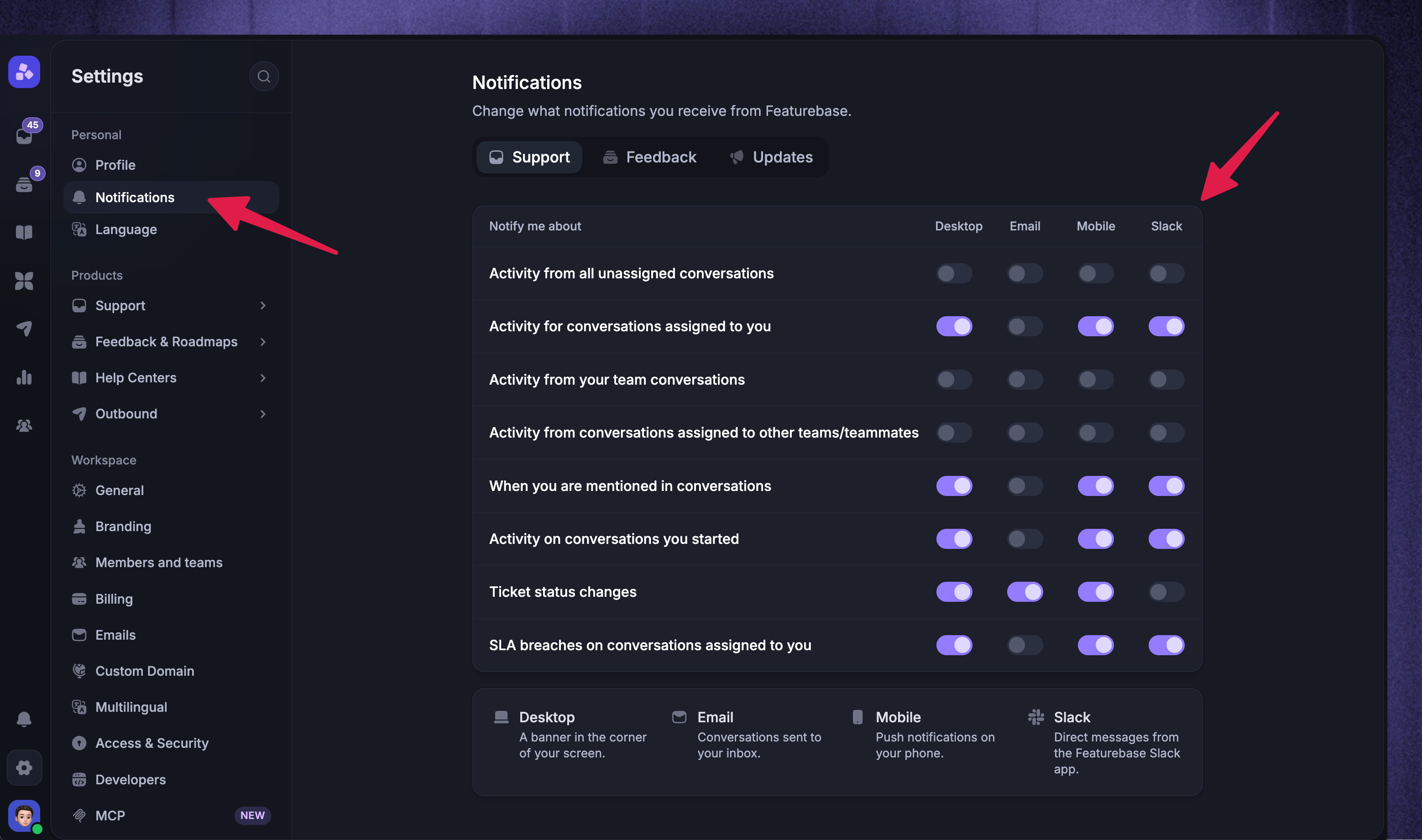
Use Slack DMs to receive updates from Featurebase's Slack app about activity that's relevant to you. To configure your Slack DMs:
Go to Settings → Notifications
Use the tabs to find the notification type you want to receive
If prompted, click 'Connect Slack Account' and authorize your personal Slack account
Turn on Slack for each notification type you want to receive
You can receive updates about activity such as:
Assignments and new replies
Mentions
Status changes
SLA breaches
Your Slack connection and notification preferences apply only to you.
Note: You cannot reply directly from a Slack notification. Open the linked item in Featurebase to respond or make changes.
Send notifications to shared Slack channels
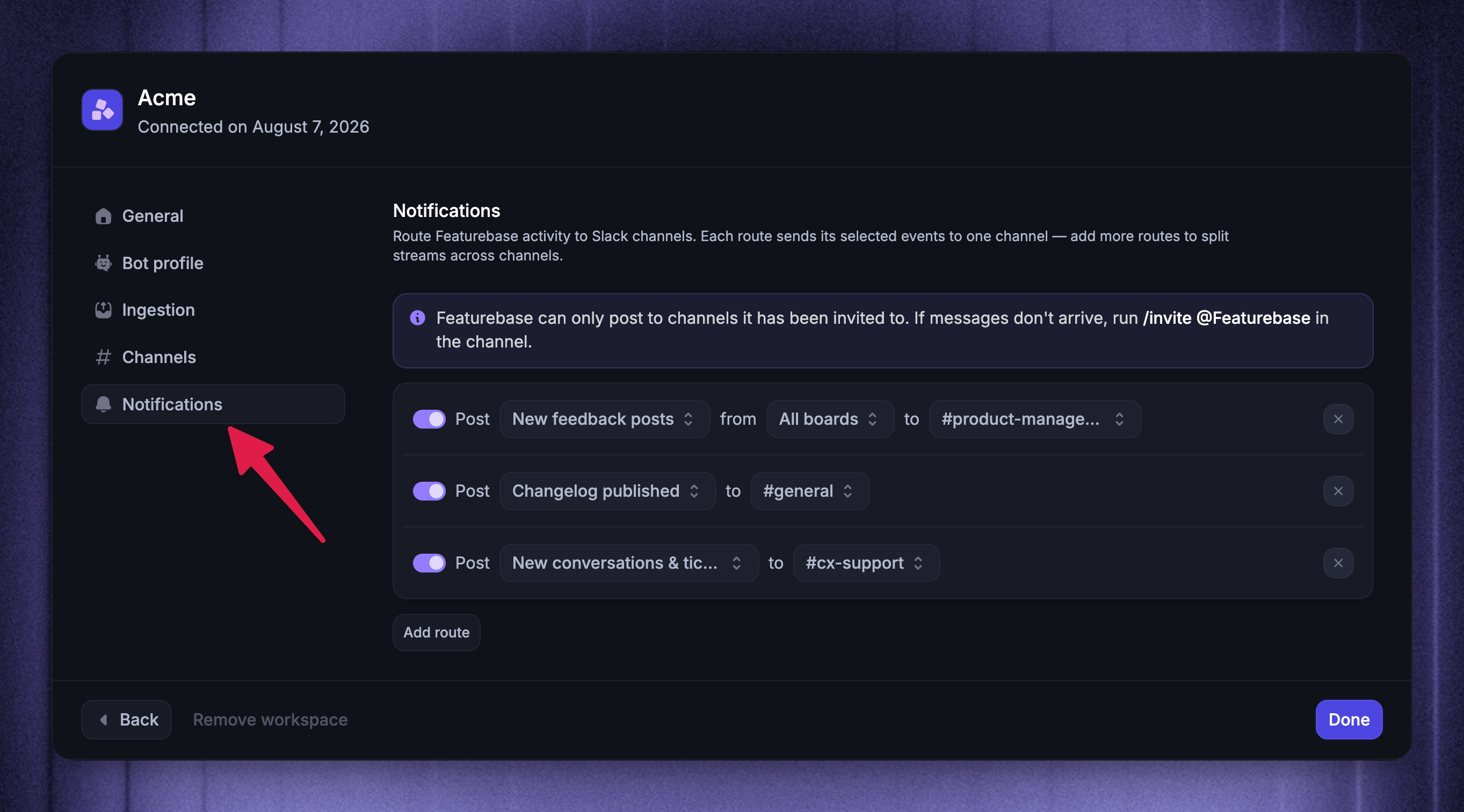
Use notification routes to send Workspace activity to shared Slack channels. Each route sends its selected events to one channel. Add more routes to separate different activity into different channels.
To add a notification route:
Choose the Slack workspace you want to manage
Open Notifications
Click 'Add route'
Select one or more events:
New feedback posts
Post status changes
New conversations & tickets
Changelog published - Sends a notification when you publish an Update
Survey responses
To filter feedback activity by board, use a feedback-only route and select specific feedback boards. Otherwise, leave All boards selected
Select the destination Slack channel
Featurebase saves route changes automatically. Use the switch beside a route to pause or resume it, or remove the route when you no longer need it.
Notes:
Featurebase can only post to channels it has been invited to. If the channel is missing or notifications do not arrive, run
/invite @Featurebasein the destination channelFor New conversations & tickets, Featurebase waits until your team needs to act. It does not announce a Conversation while Fibi is handling it or before a customer interacts with a Conversation started by a Workflow or Outbound message. If human attention is needed later, Featurebase sends the notification then
FAQs
Why is Slack missing from my notification settings?
Why is Slack missing from my notification settings?
Slack appears as a notification channel only after a Slack workspace is connected to the current Featurebase Workspace. Go to Settings → Integrations → Slack to connect one.
If Slack is available but you cannot turn it on, connect your personal Slack account when prompted and return to Settings → Notifications.
Why can't I select a Slack channel for a route?
Why can't I select a Slack channel for a route?
Invite the Featurebase Slack app to the destination channel by running /invite @Featurebase in Slack. Then reopen the Slack workspace's Notifications settings and select the channel.
Why didn't a notification route send a message?
Why didn't a notification route send a message?
Check that:
The route is enabled
The expected event is selected
The correct destination channel is selected
The Featurebase Slack app is still a member of the channel
Any selected feedback board matches the feedback post
For New conversations & tickets, Featurebase sends the notification only when human attention is needed. Conversations still being handled by Fibi or waiting for customer interaction do not trigger it yet.
Can I use Slack notifications without enabling Slack support?
Can I use Slack notifications without enabling Slack support?
Yes. A notifications-only Slack connection can route Featurebase activity to shared Slack channels. It cannot ingest Slack messages into the Inbox or access Slack support settings such as channels and ingestion.
Was this helpful?
Still need help? Ask the team