Reporting datasets
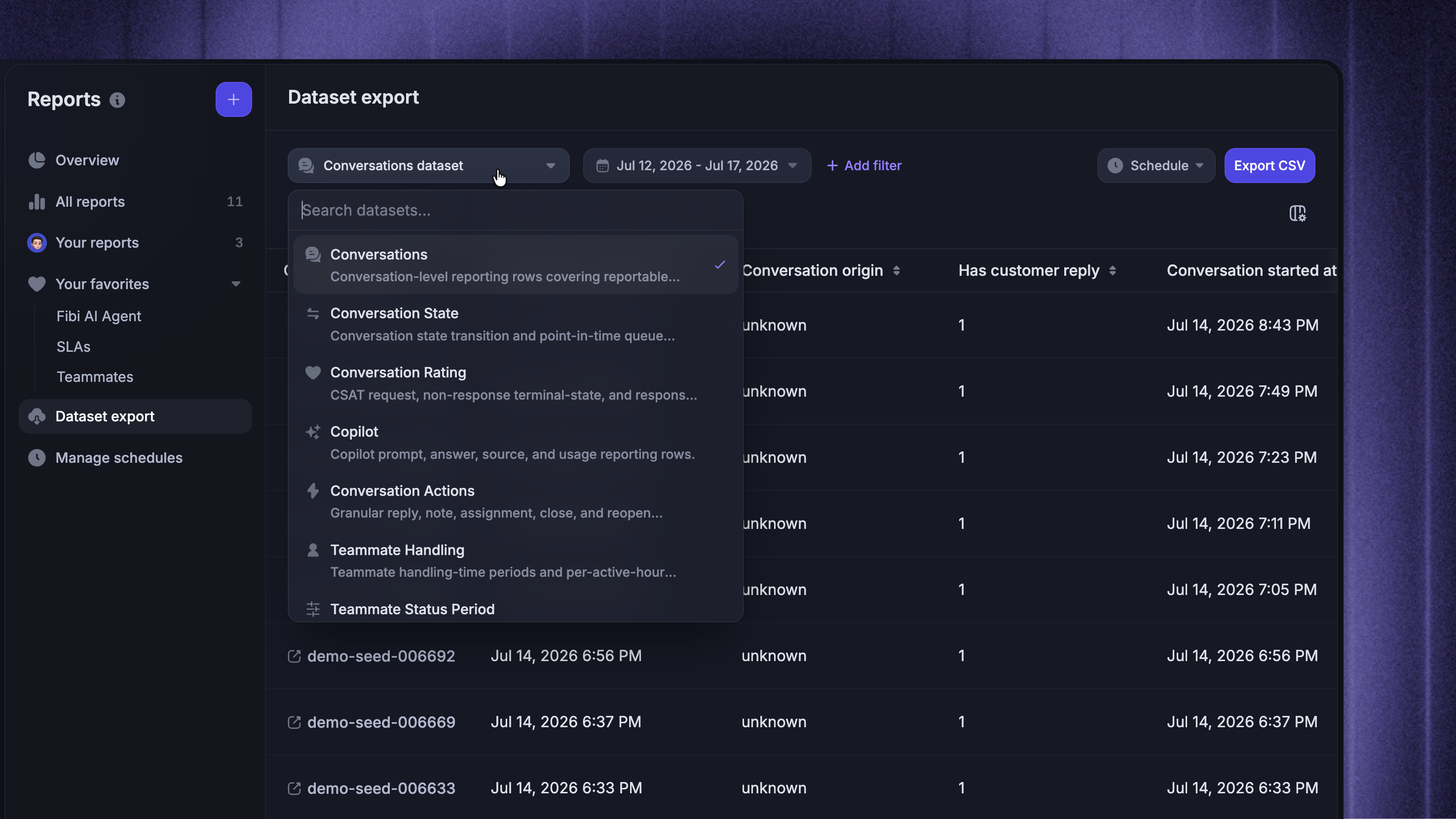
Understand how Featurebase reporting data is organized, what each reporting dataset represents, and how to access it.
Written By Markus Palm
Last updated 20 days ago
Overview
Your Featurebase Reports data is organized into datasets. A reporting dataset is basically an underlying table where every row represents one specific kind of thing. Each dataset contains related metrics and attributes.
For example, one conversation that is assigned twice, receives 3 replies, gets snoozed, reopens, and closes:
Conversations dataset contains 1 row for the overall conversation
Conversation Actions dataset contains separate rows for its replies, assignments, close, and reopen actions
Conversation State dataset contains separate rows for the periods it spent open, snoozed, or closed
Teammate Handling dataset contains separate rows for the time teammates actively handled it
The same conversation can therefore appear in several datasets, represented differently in each one.
Use this article to compare datasets and understand what each row represents when you analyze or export reporting data.
Note: You do not select a dataset directly when you create a custom report. Choose a metric or attribute, and Reports automatically uses its dataset.
Available reporting datasets
The table below describes the datasets that organize the data available in Featurebase reporting.
Tip: For programmatic access, use our public Reports API to discover datasets and query reporting data.
Was this helpful?
Still need help? Ask the team