Request workflows

Request workflow runs and troubleshooting

Check what a request workflow did on each Request, find out why a run stopped or a step was skipped, and fix a workflow that does not run.

Written By Bruno

Last updated 26 minutes ago
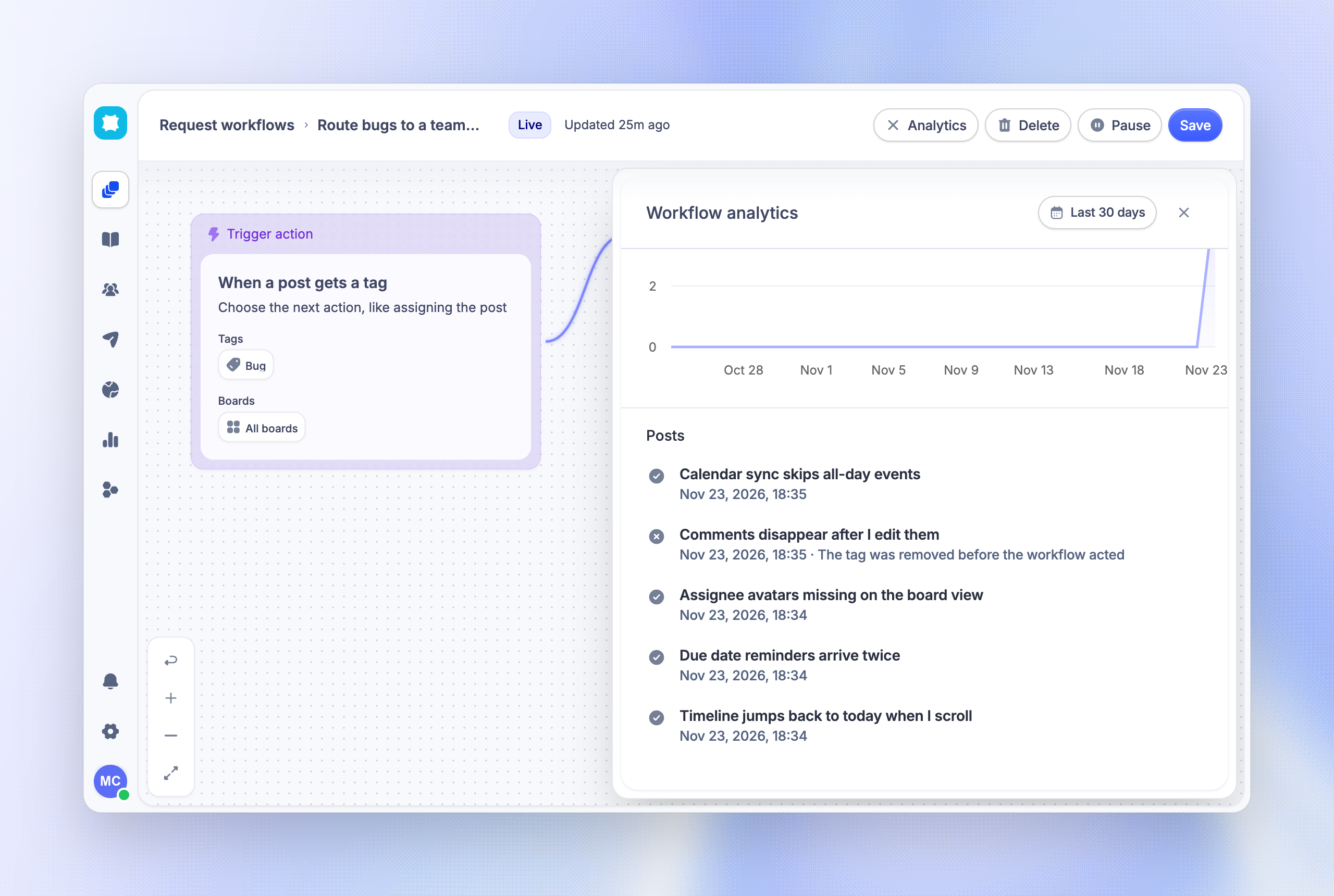
Workflow analytics of a request workflow with the Started, Completed, and Stopped numbers and the Posts list

Overview

Each time a request workflow starts on a Request, Featurebase records a run. Workflow analytics shows how many runs started, completed, or stopped, which Requests they ran on, and why a run stopped or a step was skipped.

The workflow builder calls Requests "posts", labels "tags", and categories "boards". The run texts below are quoted exactly as they appear.


Check the runs of a workflow

  1. Go to Requests & Insights → Workflows and open the workflow

  2. Click 'Analytics' in the editor header

The Workflow analytics panel opens with the last 30 days. Use the range menu to pick Today, Yesterday, Last 7 days, Last 30 days, Last 90 days, or a Custom range. Runs are kept for 90 days.

  • Started - Posts this workflow started on

  • Completed - Runs that finished all their steps

  • Stopped - Runs that stopped or failed before the end

Click a number to see its chart and its runs in the Posts list. Each row shows the Request, the date and time the run started, and the stop reason or step note.

When a run has several notes, hover over the +1 more link (or a higher number) to see the rest. Click a row to open the Request in a new tab, and click 'Load more' for older runs.

A row shows Hidden post when you cannot see the Request, for example because it is on a private board, or it is in review and you cannot moderate Requests. A row shows Deleted post when the Request was deleted.

Note: Runs on private boards are listed only for teammates who can view private Requests. In a workflow that uses a private label, only teammates who can view private request labels see the Request names.


Why a run stopped

A stopped run did not finish its steps. Steps that ran before the stop keep their changes.

Stop reason

What it means

What to do

The post was deleted

The Request was deleted during the run

Nothing

The post was merged

The Request was merged into another Request

Nothing

The post is held for review

The Request is in review or held as spam

Approve the Request or release it from spam. A run that has not changed the Request yet continues when you approve a new Request while the workflow is live

The post is on a support board

The post is a support ticket, not a Request

Nothing. Request workflows act on Requests only

The post is not a request

The post became an insight

Nothing

The post is feedback on another request

The post is kept as feedback that supports other Requests

Nothing

The post did not match the conditions

The Request did not match the trigger conditions when the run started

Check Conditions in the trigger

The status changed again before the workflow acted

When a post status changes: the status changed again during the run

Nothing. The new status change can start its own run

The tag was removed before the workflow acted

When a post gets a tag: someone removed the trigger label during the run

Nothing. Adding the label again does not start the workflow again

The assignee changed before the workflow acted

When a post is assigned: the Request got another assignee or none

Nothing. A new assignee can start its own run

The post got a new vote, comment, status or insight

When a post has no activity: the Request became active during the run

Nothing. The Request can run again after a new quiet period

The workflow could not check the post's activity

When a post has no activity: Featurebase could not confirm the Request was still quiet, so it stopped before any change

Nothing. The Request can run again after new activity and a new quiet period

A condition uses a custom field that was deleted or changed

A Branches rule uses a request form field or option that no longer exists

Fix the rule, then save the workflow

The post is on a private board, and the teammate who last saved this workflow cannot see private boards

The last teammate to save or turn on the workflow lost access to private boards, or left

Ask a teammate who can view private Requests to save the workflow again

The workflow was turned off

The workflow was paused, saved as a draft, or deleted during the run

Turn the workflow on again. Stopped runs do not restart

Your plan does not include request workflows

Your workspace is no longer on a plan with request workflows

Upgrade your plan to Enterprise

Workflows were paused by Featurebase

Featurebase paused workflows for a while

Nothing. Runs stopped this way do not restart

Actions are turned off for this workspace

Featurebase restricted actions in your workspace

Contact Featurebase support

Other run states

Text

What it means

What to do

The run stopped

The run stopped for another reason

Contact support if it happens again

The run was interrupted

The run ended unexpectedly

Open the Request and do the remaining steps by hand

Something went wrong while running this workflow

A step failed, and the run ended there

Check the Request. Contact support if it happens again

The run could not start

Featurebase could not start the run

Contact support if you see this often


Why a step was skipped

A completed run can still have steps that did not do all their work. The run went on to the next step, and the row shows a note. A note without a known reason shows A step was skipped.

Emails

Step note

What to do

Email not sent: monthly email allowance is low

Less than 20% of the month's email allowance is left. The comment or status was still written. Emails go out again when the allowance has room

Email not sent: voters were already emailed about this status change

Nothing. Voters get one email per status change

Email not sent: the post is hidden from the portal

Nothing. Requests hidden from the portal get no workflow emails

Set status

Step note

What to do

Status was already set

Nothing. The Request already had the status

Step skipped: the status no longer exists

Choose another status in the step and save the workflow

Status not set: the board of the post does not allow this status

Choose a status the board allows, or use Branches to set the status per board

Status update not posted: comments are turned off on this post

The status was set without the voter message. Turn comments on for the Request if the message matters

Status update not posted: the author left the workspace

Edit the step to post the message as you

Status update not posted: the author no longer exists

Edit the step to post the message as you

Status update not posted: the author cannot open this post

Edit the step as a teammate who can open Requests on that board

Add comment

Step note

What to do

Comment not posted: comments are turned off on this post

Turn comments on for the Request, or have a teammate with permission to manage comments edit the step

Comment not posted: comments are turned off in this workspace

Turn comments on for your workspace

Comment not posted: the author cannot open this post

Edit the step as a teammate who can open Requests on that board

Comment not posted: the author left the workspace

Edit the comment to post it as you

Comment not posted: the author no longer exists

Edit the comment to post it as you

Comment not posted: the comment is empty

Write the comment and save the workflow

Comment not posted: the author cannot write internal comments

Edit the step as a teammate who can write internal comments, or turn off Internal note

Move to board

Step note

What to do

Step skipped: the board no longer exists

Choose another board and save the workflow

Post not moved: the board is a support board

Choose a board for Requests

Post not moved: the board is not a feedback board

Choose a board for Requests

Post not moved: the board would show a members-only post to customers

Choose a board that only teammates can see

Post not moved: the board would show the post to other customers

Choose a board that the same customers can see

Labels, assignee, and other steps

Step note

What to do

Step skipped: the tag no longer exists

Choose another label and save the workflow

Post not assigned: the teammate left the workspace

Choose another teammate and save the workflow

Post not assigned: the teammate cannot be assigned to this post

Choose a teammate who can open Requests on that board

The step failed and was not tried again

A Set status or Assign post step failed. It is not tried again, so voters and trackers never get the same update twice. Check the Request and finish the change by hand

Step skipped: this step no longer exists

Remove the step. To act on AI labels, use the When a post gets a tag trigger


Limits

Limit

Value

Runs of one workflow on one Request

5 in 24 hours

Runs that one When a post has no activity workflow starts

500 a day. The other Requests wait for the next day

No activity for

7 to 365 days

Wait

Up to 90 days

Steps in one request workflow

200

Workflows in one workspace

100 by default, request and support workflows together

Age of a Request at publication

Requests dated more than 7 days ago do not start workflows when they are published

Runs in Analytics

Kept for 90 days


Why did my workflow not run?

Check these in order:

  1. State - The workflow is Live. A draft or paused workflow starts nothing

  2. Plan - Your workspace is on the Enterprise plan

  3. Trigger event - The change is one that starts the trigger. Bulk edits of several Requests, request workflow steps, integration syncs, 'Apply to existing requests', and imports never start a request workflow

  4. Boards - The Request is on one of the boards in Boards, or the trigger uses All boards

  5. Conditions - The Request matched Conditions at the moment of the event. A Request that matches only later does not start the workflow

  6. Already ran - When a post is published runs once per Request, and When a post gets a tag once per Request and label. Every trigger runs at most 5 times on one Request in 24 hours

  7. Age - For When a post is published, the Request was published after the workflow went live and is not dated more than 7 days ago. AI labels on Requests dated more than 7 days ago do not start When a post gets a tag either

  8. Request type - The post is a Request. Support tickets and insights never start a request workflow, and Requests in review or spam start one only when they are approved

  9. No activity - Featurebase looks for quiet Requests about once a day, and starts at most 500 runs a day per workflow. With Only posts that become inactive from now on turned on, Requests that were quiet before the workflow went live never start it

If the Request is in the Posts list, its stop reason or step note says what happened. Use the tables above.


FAQs

No. Turning a workflow off stops its runs, also runs that are waiting in a Wait step. Turning it on again starts runs for new events only.

They keep the steps they started with. New runs use the new version after you set your changes live.

You cannot see that Request. It is on a private board you cannot view, it is in review and you cannot moderate Requests, or the workflow uses a private label you cannot view. Ask an admin for the permission you need.

When a post status changes and When a post is assigned run on every matching change, up to 5 times on one Request in 24 hours. When a post has no activity runs again after new activity and a new quiet period.

Yes, for new events on them: a status change, a label, or an assignee change on an existing Request starts those triggers. When a post is published never runs on Requests that existed before the workflow went live. When a post has no activity runs on Requests that are quiet already when Only posts that become inactive from now on is off, up to 500 a day.

Yes. Request workflows and support workflows share one workspace limit, 100 workflows by default. When you reach it, creating a workflow fails with Workflow limit exceeded. Maximum allowed workflows: 100.