Users FAQs
Answers to common questions about the Users module – how Featurebase identifies users, tracks data, handles duplicates, deletion, and more.
Written By Markus Palm
Last updated 6 days ago
Managing user data
How does Featurebase collect and identify users?
Featurebase recognizes the people who interact with your product in three stages – visitors, leads, and users. Anonymous visitors are tracked with a browser cookie, and their location and browser details are derived from their IP address. Once someone shares an email or you sync their account, they become an identified lead or user.
Choose a data import or sync method to add customer records and keep their data up to date.
What's the difference between standard attributes, custom data attributes, qualification data, and tags?
Featurebase can store a few different kinds of data about your users:
Standard attributes – a default set Featurebase tracks automatically, like name, email, first seen, and web sessions. You can't create these, only choose which ones to display.
Custom data attributes (CDAs) – data you send us about your users, like their plan, monthly revenue, or number of projects.
Qualification data – a focused set of attributes you collect from leads, usually in the Messenger. You can reuse custom data attributes as qualification data.
Tags – manual labels you assign to users to group them for segments and access rules.
What standard attributes does Featurebase track by default?
Featurebase automatically tracks the following standard attributes for each person:
Name, Email, User ID, and Phone
First seen, Last activity, and Last contacted
Web sessions
Country, City, Timezone, and region/continent codes
Browser, Browser version, and OS
Locale and Browser locale
Companies, Tags, Posts created, and Comments created
These update automatically. You choose which ones appear on profiles and as columns in your Users directory, and you can add your own custom data attributes alongside them.
Can I set a profile picture for a user?
Yes. Pass a profile picture image URL when you sync a user's data – through the Messenger, the SDK, or the API. If you don't provide one, Featurebase automatically generates a unique avatar for that person.
Can I change a user's or lead's email address?
You can edit a lead's email address from their profile. If the new email matches an existing user, the lead will merge into that user – the next time the person visits or refreshes.
When a user is identified by a User ID, the User ID – not the email – is their unique identifier, so updating the email simply updates the field. Avoid giving two different people the same email with different User IDs, as this creates separate profiles.
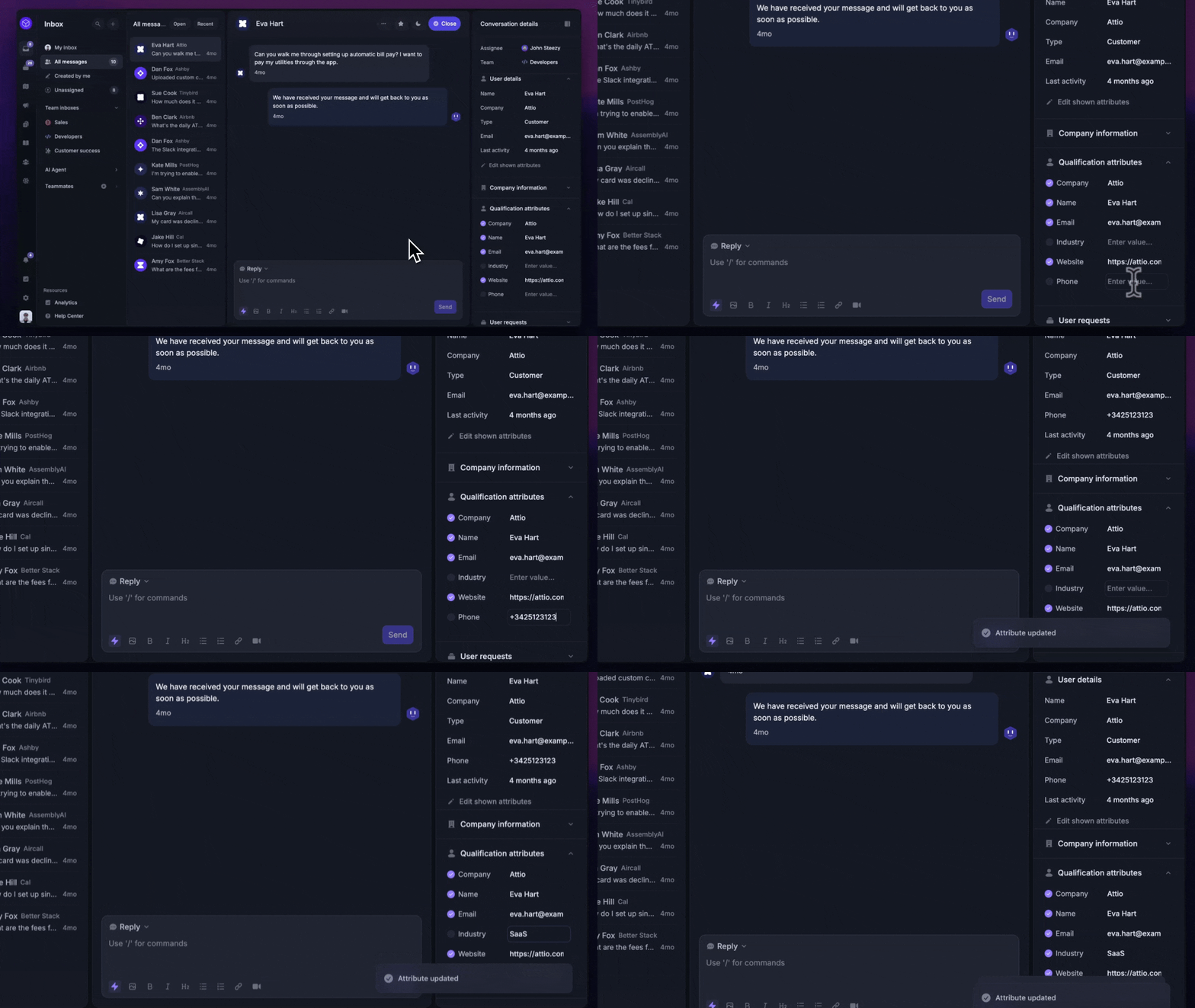
You can also update leads’ email straight from the support Inbox via the qualification attributes:
How do I tag or untag a user?
Open the person's profile, find their Tags, and add a tag or hover over an existing one to remove it. Tags power segments and access rules.
Can I add notes to a user's profile?
Featurebase doesn't have standalone notes on user profiles. You can instead leave internal notes inside a conversation in the Inbox – these are visible only to your team and stay attached to that person's conversation history.
Can I add custom attributes for my teammates?
No. Custom data attributes apply to users and companies only, not to your teammates (admins).
Can I export users, leads, and companies?
Yes. You can export customer records as CSV or Excel from the Users directory.
How do I permanently delete a user or lead?
There are two ways:
From the dashboard – open the profile in your Users directory, click the
⋅⋅⋅menu, and select Remove. This erases their personal information, but keeps their posts, comments, and upvotes under the name [Deleted] so you don't lose feedback others have engaged with.Via the API – to also remove their content, delete it through the API before deleting the user.
Deletion is immediate and permanent.
Understanding user data
What's the difference between a user and a teammate?
Users (and leads) are your customers and end-users, tracked in the Users directory. Teammates – also called admins – are members of your own team who log into the Featurebase dashboard to manage feedback and support. Custom data attributes, tags, and segments apply to users, not teammates.
How does Featurebase handle user names?
Featurebase stores a single name field – it doesn't split names into separate first and last names. If an anonymous visitor starts a conversation without sharing any details, Featurebase auto-generates a friendly placeholder name like "Yellow Antelope" until they provide a real one.
How is a web session counted?
Featurebase increments a person's web session count when:
It's their first ping (first time they're seen)
They return after more than 30 minutes of inactivity
They stay continuously active for more than 24 hours
Does Featurebase show whether a user is currently online?
No. Featurebase doesn't track real-time online presence, so there's no live "online now" indicator. The Last activity attribute shows when a person was last active.
What happens to a user's feedback when I delete them?
Deleting a user removes their personal data, but their feedback posts, comments, and upvotes remain under the name [Deleted] – so you don't lose feature requests that other users have already voted on or discussed. To remove that content too, delete it via the API before deleting the user.
Troubleshooting
Why am I seeing duplicate profiles for the same person?
Duplicates usually happen when the same person is identified inconsistently – for example, a different User ID on each visit, cleared cookies, or email-only contact without a User ID. Passing a consistent User ID keeps everything on one profile.
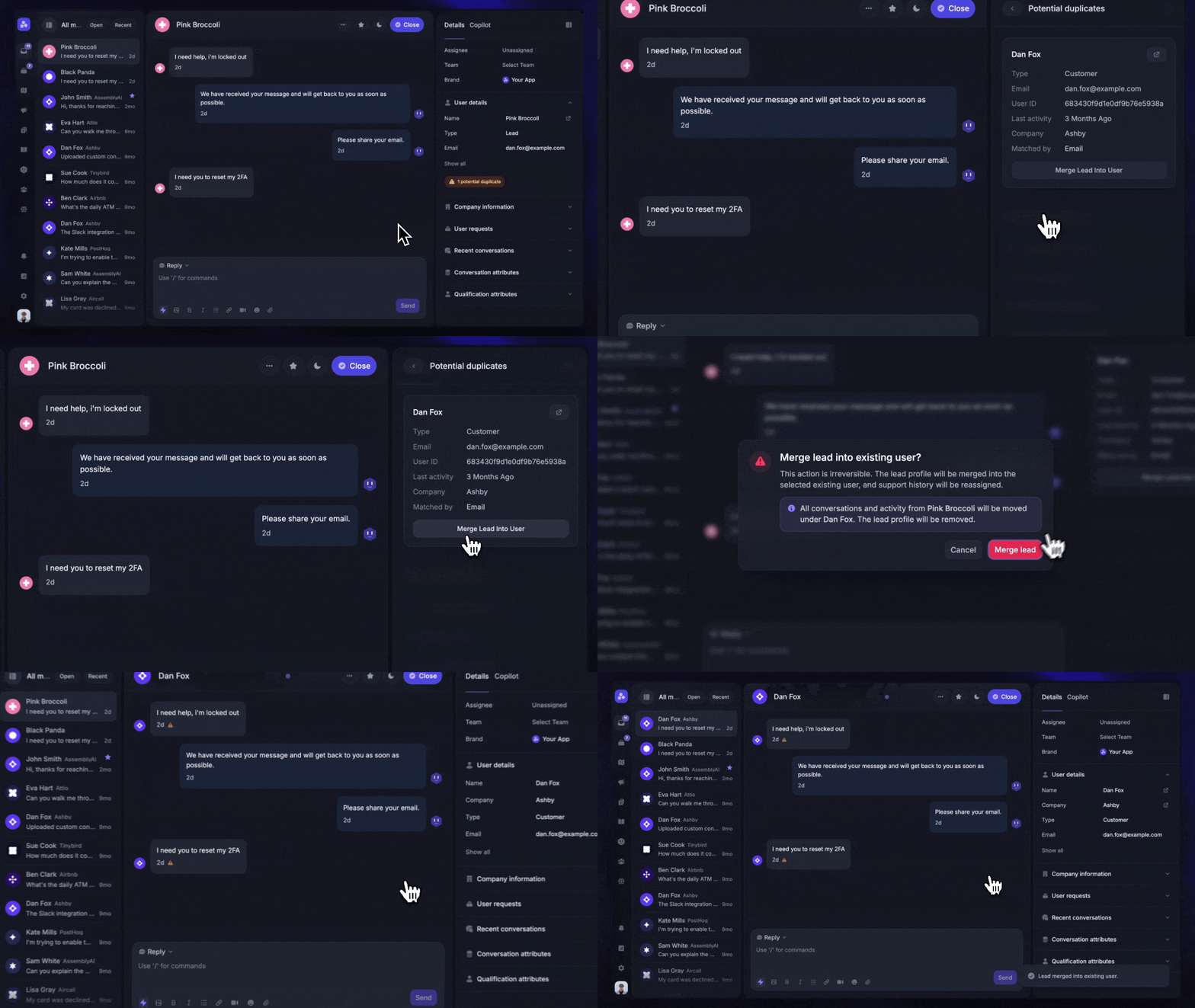
A lead and a user for the same person can be combined by merging the lead into the user. Note that you can merge a lead into a user, but not two users together.
Some users in my app aren't showing up in Featurebase
The Messenger and SDK run in the browser as JavaScript, so ad-blockers or privacy extensions can stop them from loading – which means those people never get synced. To capture everyone regardless of their browser setup, sync your users from your backend using SSO or the API.
Can I recover a user after I delete them?
No. Deletion is immediate and permanent – there's no grace period or recovery window. Because the record is fully removed, you can immediately reuse the same email or User ID for a new profile.
Was this helpful?
Still need help? Ask the team