API documentation overview
Publish an API reference from your OpenAPI spec beside your Help Center articles, with code samples, a Try it playground, versions, and AI-ready pages.
Written By Markus Palm
Last updated 13 days ago
Overview
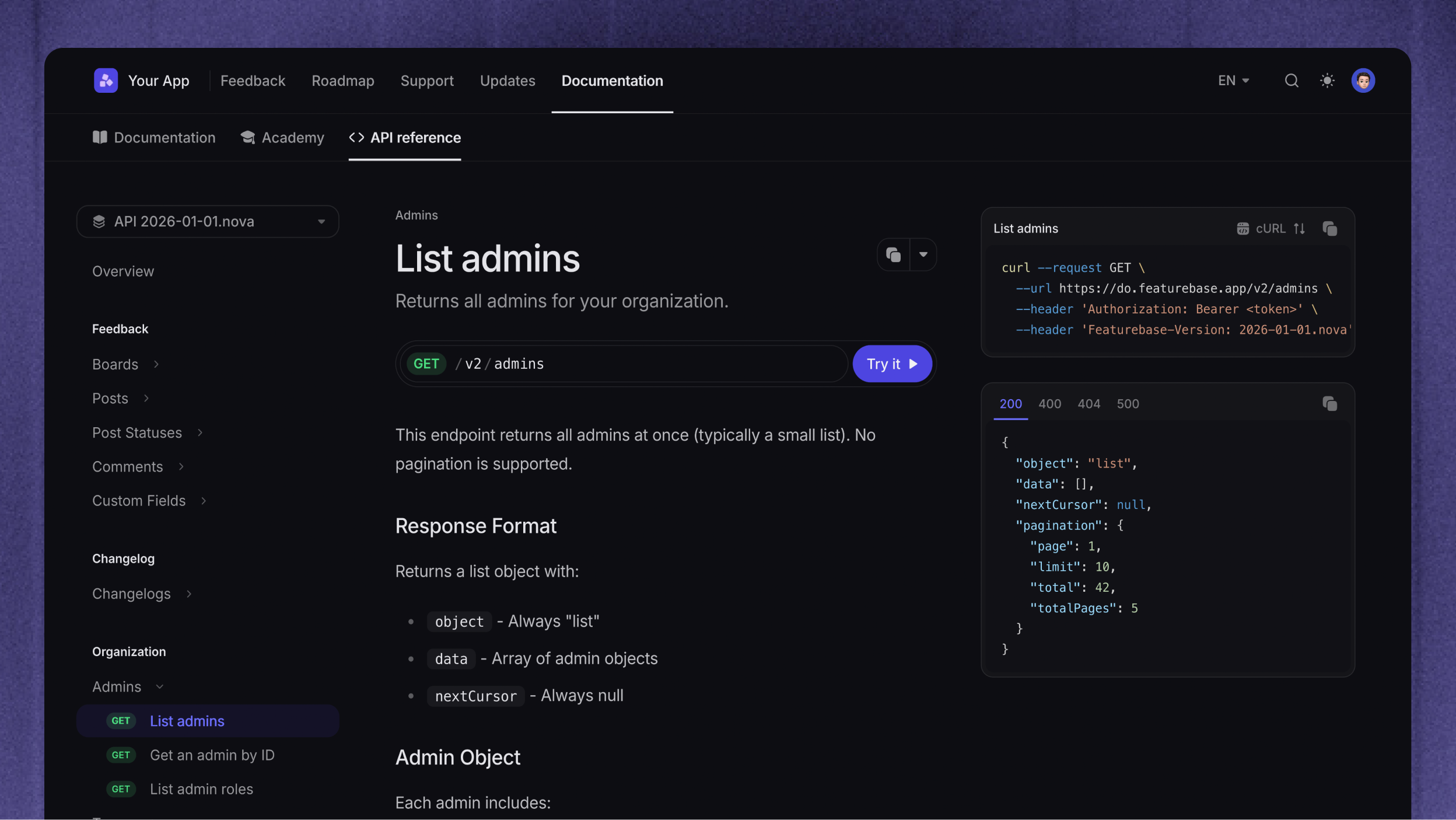
API documentation turns your OpenAPI spec into an API reference in your Help Center: a tab of endpoint pages next to your articles, with request examples, a Try it playground, and a version switcher.
You need an OpenAPI 3.0 or 3.1 spec in JSON or YAML and the Manage Help Center permission. You manage everything under Settings → Help Center → API reference.
What readers get
Endpoint pages
Every endpoint in your spec gets its own page in the API reference tab, grouped by the spec's tags. Each page shows the endpoint's description, parameters, request body, and responses with their schemas. Readers also find endpoint pages through Help Center search, next to your articles.
Request examples and Try it
Each endpoint page shows a request example with a language switcher. You can offer nine languages: cURL, JavaScript, Python, PHP, Go, Java, Ruby, C#, and TypeScript.
With Try it, readers send a test request to your API from the page and see the response. For each version, you choose whether Try it sends requests, shows samples only, or is off.
Versions and multiple APIs
Each spec you import is one version of your API. When two or more versions are published, readers switch between them at the top of the API reference sidebar. You choose the default version that readers see first, and you can deprecate or archive old versions.
You can also publish more than one API in one Help Center, such as a Core API and a separate Payments API. Each API has its own versions, default version, and tab in your top bar.
AI-ready pages and Fibi
Endpoint pages have a page actions menu, like articles. Readers can copy or view a page as Markdown and download the spec, and on public pages they can open it in ChatGPT or Claude. By default, your Help Center's llms.txt lists the endpoint pages of each API's default version.
When Fibi AI Agent uses your Help Center as a knowledge source, it can answer API questions from the published endpoints of each API's default version and link to the endpoint pages.
Guides beside the endpoints
The API reference tab can also hold regular Help Center articles, such as an authentication guide or a quickstart, above the generated endpoint pages.
To document an endpoint without a spec, use the API blocks in a regular article.
How publishing works
Import: Upload a file, link a public URL, or push the spec from your CI pipeline.
Review: The import arrives as a draft. Check its endpoints, changes, and warnings before readers see anything
Publish: The endpoint pages go live in your Help Center
Update: Featurebase checks a linked URL every 6 hours, and your pipeline can push each new version. Each change arrives as a new draft, unless you let CI pushes publish without review.
Roll back: Make an earlier revision live again if a published change was wrong.
Was this helpful?
Still need help? Ask the team