Automatic language detection in conversations
How a customer’s language is determined in conversations for Fibi AI Agent and Workflows.
Written By Markus Palm
Last updated 17 days ago
Overview
Featurebase runs AI-powered language detection on all conversations to determine which language to use when communicating with customers. This applies to Fibi AI Agent, Workflows, and AI Inbox Translations.
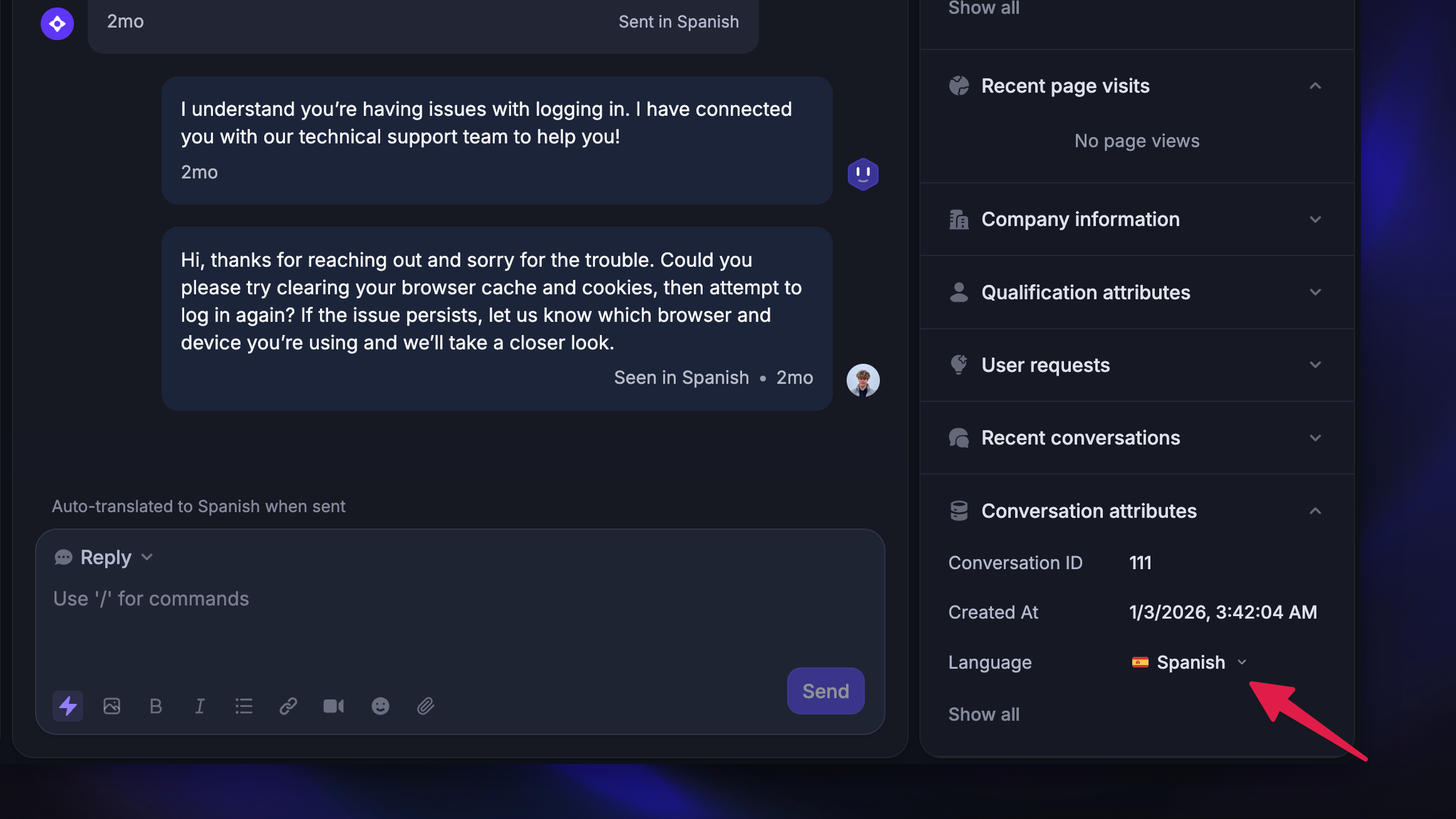
Every time a customer sends a new message, the system analyzes it along with recent messages to detect the language. If the detection is confident enough, it sets the conversation's Language attribute accordingly.
You can see the detected language in the right sidebar of the Inbox under Conversation attribute (screenshot above).
Once the language has been automatically detected, Fibi and Workflows will continue using that language for the remainder of the conversation without attempting to detect language again.
If there isn't enough customer content in a conversation to confidently detect a language, the system falls back to:
The customer's browser language (if available), otherwise
Your workspace default language
Language detection priority
Fibi, Workflows, and AI Inbox Translations determine a customer's language in the following order:
Admin language override, if set
AI-powered language detection, if confidence is high enough
Customer's browser language
Workspace default language
Language override
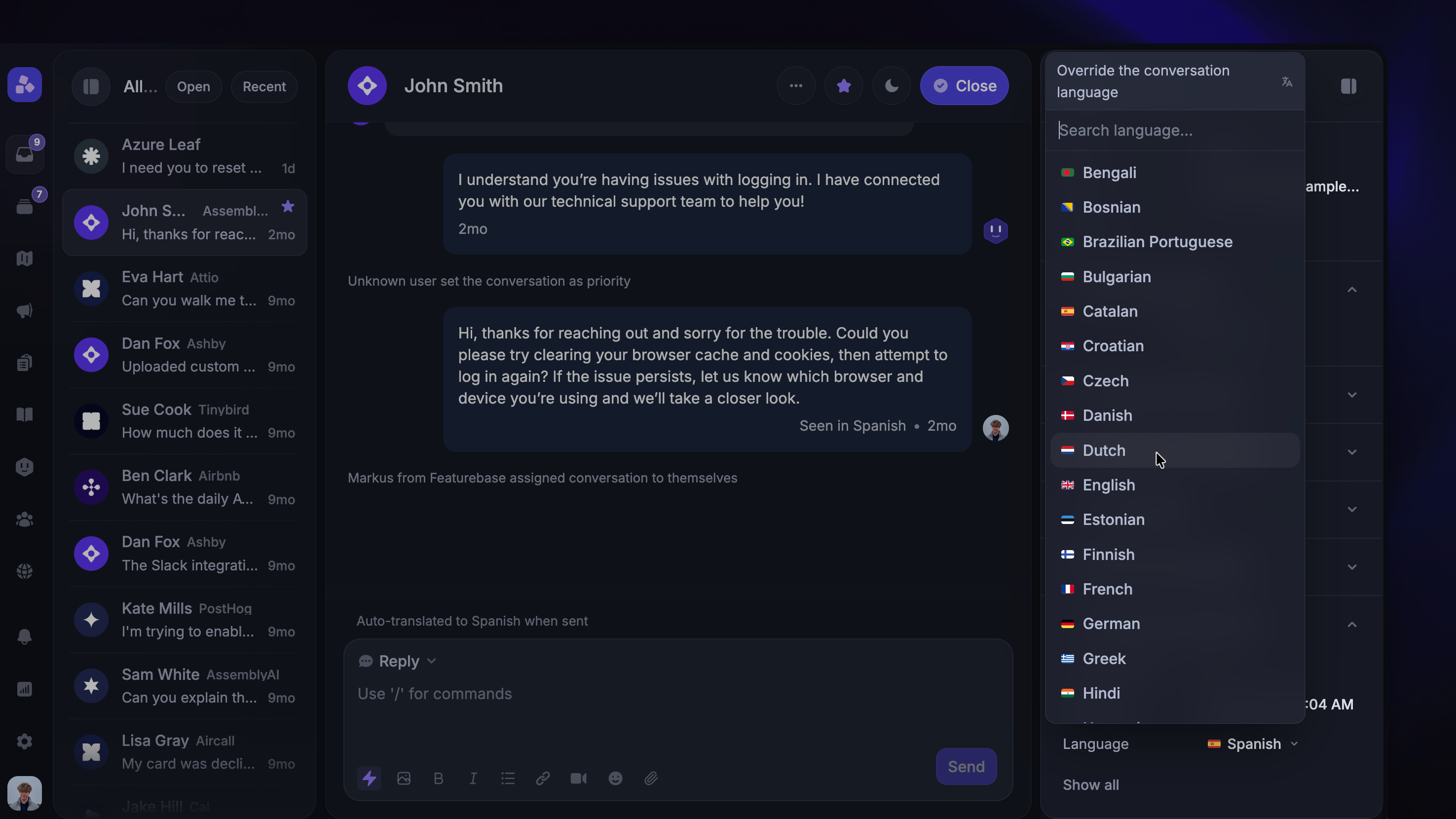
You can manually override the detected language for a conversation by clicking the Language attribute in the right sidebar of the Inbox.
Once overridden, automatic detection will no longer change the language for that conversation. Fibi and Workflows will use the overridden language going forward.
Learn more about manually setting conversation language: AI inbox translations
Note: Language overrides are set per conversation. If the same customer opens a new conversation, language detection starts fresh.
Good to know
Language detection runs on every new customer message, but the conversation language is only updated when confidence is high enough
Messages that consist mostly of code, special characters, or non-natural language content are excluded from detection to prevent incorrect language changes
Very short messages may not provide enough context for accurate detection – the system uses the rolling context of recent messages to compensate
If the customer's browser language is set to English and no other language signal is available, the first message in a Workflow will default to English regardless of your workspace default language
FAQ
Why is my workflow not translating the first message automatically?
Why is my workflow not translating the first message automatically?
The system determines the language of the first message using this logic:
It checks the language of the first customer message(s). If it cannot detect a language, it uses the customer's browser language. If that is also unavailable, it defaults to your workspace default language
If the customer's browser language is English, the Workflow sends the first message in English
Only after the customer interacts further does the Workflow have enough context to detect and switch languages
To ensure your Workflow sends the first message in a specific language, set up separate Workflows for each language and use the detected language attribute to target customers.
Why did Fibi respond in the wrong language?
Why did Fibi respond in the wrong language?
Fibi can occasionally misidentify languages that are closely related or have similar spelling patterns, particularly with short messages where there is limited context. Detection accuracy improves with longer messages and more conversation history.
If this happens, you can manually set the correct language using the Language override in the conversation sidebar.
Can language detection distinguish between regional language variants?
Can language detection distinguish between regional language variants?
Language detection identifies the base language (for example, Spanish) but may not always distinguish between regional variants (for example, Mexican Spanish vs. European Spanish).
If needed, you can manually set the correct variant using the Language override.
Does language detection work for all languages?
Does language detection work for all languages?
Language detection works for all languages configured in your workspace's Supported languages. The full list of available languages can be found in your workspace settings.
What happens if a customer switches languages mid-conversation?
What happens if a customer switches languages mid-conversation?
The system detects language on every new message. However, once a language is set with high confidence, it persists for the remainder of the conversation.
If a customer switches languages, you can manually override the language in the conversation sidebar.
Was this helpful?
Still need help? Ask the team